Countering security threats in embedded device development with code encryption and debugger detection (anti-debugging function)
With the shift to IoT, security threats to embedded devices include the loss of information assets, making it important to develop devices that take into account threats such as unauthorized Access and vulnerabilities such as security holes. This column provides an overview of the security technology concepts and usage methods of Wibu-Systems' CodeMeter products.
Overview
What you can do with Wibu-Systems' CodeMeter security technology
By making full use of CodeMeter security technology, application programs used in embedded systems are encrypted and digitally signed for strong protection.
- Countermeasures against reverse engineering
- Software copy protection
- Application Integrity Protection
(Prevention of tampering and counterfeiting) - License activation is possible for each feature
- Flexibility in Access control management
By incorporating the software and API provided by Wibu-Systems, powerful security protection measures can be implemented in a short period of time.
It also saves you time and effort in software protection measures and protects your software from piracy and reverse engineering.
*Source: Wibu-Systems Inc.
Commentary
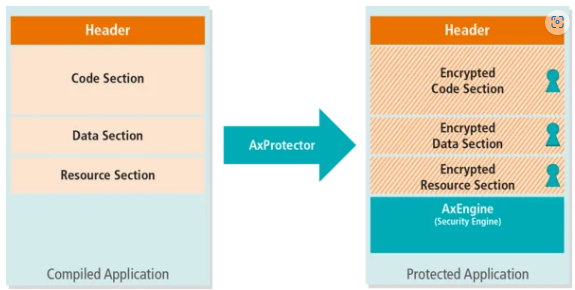
AxProtector products: full software encryption tools
- AxProtector encrypts the software suite you want to protect and protects it with a security shell, AxEngine, after which the best anti-debugging and anti-disassembly methods are inserted into the software.
- No source code changes are required. AxProtector is integrated as a post-build process. Encryption operations are performed by AxProtector after compiling your software and before creating your setup. AxProtector can be used both via a GUI (Graphical User Interface) and a command line tool.
As a command line tool, AxProtector can be run continuously integrated into automated build systems.
When you start the protected software, the AxEngine code runs first.
AxEngine will check for available licenses.
If a license is available, it is automatically assigned and used to decrypt the protected software.
Additionally, AxEngine performs integrity checks to verify possible tampering attacks. - AxEngine constantly monitors your software for security threats using advanced anti-debugging and anti-reverse engineering methods. It immediately suspends software execution if a risk is detected. As an ISV, you can define whether your license should be locked in these situations. A watchdog within AxEngine regularly checks your license, integrity, and possible threats in the background.
*Source: Wibu-Systems Inc.
-
Original Code
-
Encrypted Code
*Source: Wibu-Systems Inc.
Creating Variants
To increase the complexity of the software, software functions are copied as variants of the function, and the wrapper function selects which variant to execute depending on certain input parameters of the function.
Modifying variants
Each individual variant is modified to only work within the range of values that are valid for that variant, preventing an attacker from patching the wrapper function to only execute the same variant every time.
Variant Encryption
All variants are encrypted to prevent attackers from reverse engineering the code without first decrypting it.
Inserting a trap
In addition to the already created variants, a further variant is inserted as a trap and encrypted. The trap contains a locking code, and once the trap is decrypted via the dongle, the dongle self-locks and can no longer be used for decryption. This prevents an attacker from decrypting all the methods without reverse engineering.
Choosing a dongle variant
The wrapper function uses the dongle to select the variant: the input parameters are sent to the dongle and the variant to be used is returned. This makes it impossible for an attacker to distinguish the desired variant by simply reverse engineering the decrypted wrapper function. To be absolutely certain, they would need to run the code for all possible input parameters.
Dongle State Engine
The developer knows that the functions can only be executed in the order they choose. The most recent decryption method is saved as state on the dongle. The next decryption checks if this state is met. If not, a trap is set off, preventing the attacker from trying all variants of the software at any time. The attacker must always return to the starting point, increasing the complexity of the attack.
Decoding Delay
During normal operation, only a certain number of decryptions can be performed every 30 seconds. This number is stored as the dongle's decryption threshold. The dongle paces its decryption efforts accordingly. This mechanism not only makes the process more complex, but also slows down attackers.
- quotation
Example
Easy to use!: The UI is intuitive and allows for easy encryption.
Start AxProtector, specify the file name, and configure the security settings.
All protection can be done through on-screen operations, so no programming knowledge is required, significantly saving time and money!
Video: See how your application reacts when it detects a debugger!
Files that can be encrypted
- Windows 32bit/64bit program
- .NET Assembly
- Java App
- macOS Programs
- Linux Programs
- AI algorithm (python)
- Virtual environments such as Docker Containers and VMs
- Text file
Python code can also be encrypted
Can be distributed as platform-independent software.
The encrypted Python code has every function encrypted individually.
With just one encryption step, you can distribute your Python assets safely across multiple platforms.
*Source: Wibu-Systems Inc.
Anti-debugging feature
It is equipped with powerful countermeasures to block analysis by hackers, including an anti-debugging function to prevent analysis by debuggers.
(It also has a security lock function that locks the hardware itself when a debugger is detected.)
- Basic Debugger Checks
Build anti-debugging features into your program that are based on basic debugger checks.
Detects the debugger and does not run if detected.
- Kernel Debugger Check
This incorporates kernel-level debugging prevention functionality into programs.
Detects kernel debuggers and does not run them if detected.
- Advanced Debugger Checks
In addition to basic debugger checks, it also incorporates more advanced debugger prevention features into your programs.
It will detect a debugger and will not run if detected.
- IDE Debugger Checks
Checks for the presence of a debugger in an integrated development environment such as Visual Studio. Prohibits connection from a program development tool for debugging purposes.
It will not run if an IDE debugger is detected.
- Enable License Access Lock
If it detects a target with the anti-debugging scheme option enabled above, it will lock Access to the license.
*You can set detailed rules for applying the lock using the "Settings" button.
Reference
We have an encryption and protection demo system using Nvidia Jetson.
We are available to provide you with the following technical information at any time during our workshops:
- Setting up the NVIDIA Jetson Nano Developer Kit
- Build a program for human pose estimation on Jetson development kit
- Encrypt Python data and check decryption using a license
- Camera-based human pose estimation using Python data
- Encrypted data confirmation
For more details and to apply for the workshop, please click on this banner