

In our daily lives, motion detection sensors are used in a variety of places, such as automatic faucets, automatic lighting, and automatic doors at entrances. In recent years, the use of motion detection is also being considered for applications that capture the presence or small movements of people, such as occupancy confirmation and monitoring in elderly care homes and facilities.
INFRARED LIGHT PHOTOSENSORS and similar devices are widely used for everyday motion detection, but they have limitations depending on the environment and installation conditions. These include being affected by ambient temperature and sunlight, incorrectly detecting a person as absent when they are stationary, and difficulty in precisely determining the detection location. One option to overcome these challenges is the millimeter-wave sensor, which can capture everything from walking to subtle body movements while sitting.
The A121 from Acconeer AB (hereinafter referred to as Acconeer) is a sensor IC that employs a 60GHz pulse coherent radar (PCR) method. In this article, we will explain the positioning, key parameters, and evaluation procedure of the Presence Detector, which is fundamental to human presence detection, and its application, Smart Presence, using Acconeer's evaluation GUI tool, "Exploration Tool."
Human presence detection using millimeter-wave sensors
Motion detection is a technology that uses sensors such as infrared or millimeter-waves to detect the movement or presence of people in the surrounding area. It is used to automatically control lighting, air conditioning, faucets, etc., in response to people approaching or being present in a room. Typical examples include the automatic activation of entrance lighting using motion sensors, and the automatic control of toilet faucets and ventilation fans.
Various sensors are used for human presence detection, and they are selected according to the required performance and operating environment.
Table 1 summarizes the characteristics of typical human motion detection sensors.
Table 1: Comparison of characteristics of motion detection sensors
| Evaluation items | Millimeter-wave sensor | INFRARED LIGHT PHOTOSENSORS | ULTRASONIC SENSORS | Camera Sensor |
|---|---|---|---|---|
| Station detection | ◎ Detects minute body movements associated with breathing. | △ It may be difficult to detect when stationary. | △ Stationary objects are difficult to capture. | ◎ Even people who are standing still can be seen in the image. |
| Environmental resistance (Effects of temperature and light) | ◎ Less affected by darkness and ambient temperature | × Ambient temperature, sunlight, and installation conditions have an effect. | △ Changes in sound speed due to temperature | × Weak in dark places and backlit situations |
| privacy | ◎ Use of radio waves | ◎ Infrared use | ◎ Using ultrasound | × Camera footage used |
| Obstacle penetration | ◎ Depending on the material and thickness, non-metallic materials can be penetrated. | × Not transparent | × Not transparent | × Visibility is necessary. |
| Cost and ease of use | 〇 | ◎ | ◎ | × |
- ◎: Particularly suitable, ○: Suitable, △: Limited depending on conditions, ×: Generally not suitable
- This table shows the general trends for each sensor type. Actual detection performance will vary depending on product specifications, target object, distance, installation angle, surrounding environment, material conditions, etc.
Millimeter-wave sensors offer an alternative to conventional methods, addressing issues such as static detection and environmental conditions.
The main reasons are the following four points:
Stationary detection is possible.
In conventional systems, a person may be deemed "absent" even if they are barely moving.
Millimeter-wave sensors capture subtle movements associated with sitting, such as body movements and breathing. Even in situations with minimal movement, such as during desk work, reading, or sleep, the sensors can detect subtle changes in breathing and body movements, making it easier to maintain occupancy detection.
Less susceptible to environmental changes
With methods such as INFRARED LIGHT PHOTOSENSORS and camera sensors, ambient temperature and light conditions may affect the detection results.
Millimeter-wave sensors utilize radio waves, making them less susceptible to light and ambient temperature fluctuations. However, their effectiveness against factors such as rain, snow, surrounding objects, installation conditions, enclosure, and vibrations at the installation site requires evaluation on an application-specific basis. With appropriate waterproof and dustproof design and evaluation in actual operating environments, their application to outdoor use can also be considered.
Privacy-conscious detection
Since camera sensor systems acquire images, careful consideration must be given to the shooting range and how the image data is handled.
Because millimeter-wave sensors do not acquire images, they allow for a more privacy-conscious design compared to camera-based systems.
Obstacle penetration
Optical sensors and camera sensors require a clear optical path, such as by providing a window that allows a clear view of the object being detected.
Millimeter waves can penetrate non-metallic materials such as glass, resin, and fabric, depending on the material and thickness. Therefore, it is possible to place sensors inside non-metallic covers, allowing for product designs that do not compromise the appearance.
However, even millimeter-wave sensors can sometimes misinterpret changes in reflection caused by moving doors or curtains, plants, or vibrations in the installation area as human movement. Therefore, it is important to check the measurement range, installation location, and parameters in the actual usage environment.
For those who want to learn more about Acconeer's millimeter-wave sensors.
For information on the features and product lineup of Acconeer's 60GHz millimeter-wave sensors, please visit the Acconeer product page.
Presence Detector and its application, Smart Presence
Acconeer offers two types of human presence detection applications: the basic "Presence Detector" and its advanced version, "Smart Presence." These can be viewed using Acconeer's evaluation GUI tool, the Exploration Tool.
First, use Presence Detector to check the basic operation, and then use Smart Presence when you want to check control that is closer to actual usage scenarios, such as detection status of multiple zones and setting switching via Wake-up config.
Basic characteristics of a Presence Detector
The Presence Detector is a basic function that analyzes changes in reflection within a specified measurement range to detect the movement of people and objects. It detects changes in reflection within or between FRAMES, rather than detecting the movement FRAMES a completely stationary object itself.
Relatively fast movements such as walking, approaching, and crossing are primarily detected by Intra detection, while subtle movements such as body movements while seated and breathing are primarily detected by Inter detection. The Exploration Tool allows you to view the detection results in the distance direction, as well as the changes in Intra and Inter scores over time.
The Presence Detector considers judgment LOGIC and parameters tailored to the application based on the detection results. However, the detection results alone cannot directly determine the movement state, such as whether a person is approaching or simply passing by.
Features of Smart Presence, which utilizes Presence Detector technology.
Smart Presence is a reference application based on Presence Detector that divides the measurement range into multiple zones and allows you to check the detection status of each zone. LOGIC for determining approach and passage using time-series information of the zones will be considered according to the application.
The documentation also includes control examples that closely resemble actual usage scenarios, such as switching between a Wake-up config for low-power monitoring and a Nominal config for detailed detection.
Use Smart Presence to verify basic operation with Presence Detector and to check control that is closer to actual usage scenarios.
Table 2 Positioning of Presence Detector and Smart Presence
| Item | Presence Detector | Smart Presence |
|---|---|---|
| Positioning | Basic functions of motion detection | Examples of applications using Presence Detector |
| What can be confirmed | Detects movement and presence within a specified range. | Check movement and detection status in multiple zones. |
| Main purpose | Basic evaluation of sensors, consideration of proprietary judgment LOGIC | Verification of control that closely resembles actual usage scenarios. |
| Exploration Tool | 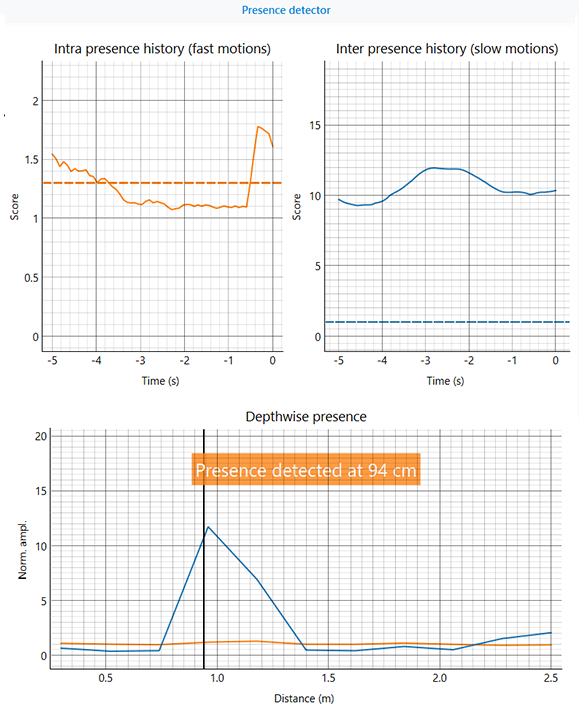 | 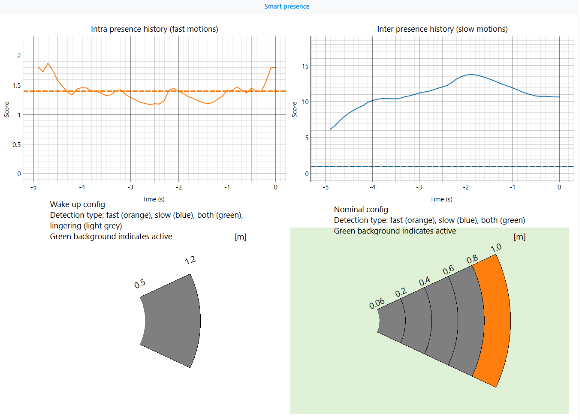 |
For those considering evaluating Acconeer products
For information on Acconeer's product lineup, evaluation boards, and case studies, please visit the Acconeer product page. For product selection and evaluation methods tailored to your application, please Inquiry Nexty Electronics.
Key parameters to adjust according to the usage environment.
The Presence Detector has parameters to adjust the measurement range, detection sensitivity, responsiveness, and speed of motion to be detected. While basic operation can be confirmed with the default settings, it can be customized according to the target object, installation location, surrounding environment, and required response time.
You don't need to change everything at the start of the evaluation. First, adjust the measurement range using Range start and Range end, and then take measurements with OTHERS settings as default. If there are issues with the results, first check the measurement range and installation conditions. Then, check the Intra score and Inter score, and adjust each of the threshold, time constant, and cutoff frequency items related to the symptoms one by one.
Parameters related to measurement range and FRAMES
Range start: Measurement start distance
Range start sets the starting distance for the measurement range.
Depending on the profile settings, configurations and corrections that take into account the effects of direct leakage are necessary. For the direct leakage effect distance for each profile setting, please refer to the separate technical column, "How to Quickly Evaluate the Acconeer A121".
Furthermore, if the measurement distance is long, it is recommended to enable "Enable automatic subsweep config".
Range end: Measurement end distance
The Range end setting determines the end distance of the measurement range. Setting it wider than necessary will increase the likelihood of including reflections from walls and surrounding objects.
Frame rate: FRAMES rate
This is the frequency per second at which the millimeter-wave sensor updates its motion detection data. Increasing FRAMES rate allows the sensor to capture changes caused by movement of people or objects at shorter time intervals, resulting in a faster detection response time. However, it also increases current consumption because the number of measurements and updates per unit time increases. FRAMES rate is related to processing variations between and FRAMES FRAMES as well as the calculation basis for the time constant.
Sweeps per frame: Number of sweeps per FRAMES
To perform human presence detection, you specify how many sensor measurements (sweeps) to perform within a single data acquisition unit (FRAMES), ensuring the detection of fast movements and data stability. Increasing the number of sweeps allows for signal evaluation with reduced noise interference and calculation of the phase standard deviation, leading to more stable detection results.
However, due to the limitations of the A121's internal buffer capacity, the amount of data must be set to satisfy the following conditions.
Number of points × Sweeps per frame ≤ 4095
Enable automatic subsweep config:
This function divides the measurement distance area into multiple sub-sweeps based on the set measurement conditions and automatically sets the measurement conditions for each area.
A subsweep is a small region created by dividing the measurement distance range into smaller areas. You can set the Profile, HWAAS, Step length, and Number of points for each region. For short distances, you can reduce the Profile size or increase the Step length to improve distance resolution and avoid direct leakage. Conversely, for long distances, you can improve the signal-to-noise ratio by setting larger Profile and HWAAS values.
Enabling this parameter will allow the Exploration Tool to automatically set the parameter for each subsweep.
The difference between intra detection and inter detection.
The Presence Detector uses two detection processes, Intra detection and Inter detection, depending on the speed and type of movement. Both calculate a score to determine the presence of a person, but they differ in the units of data they examine and the types of movements they are best suited for.
Table 3 Comparison of Intra detection and Inter detection
| Item | Intra detection | Inter detection |
|---|---|---|
| Main detection targets | Walking, approaching, crossing, limb movements | Body movements and breathing while seated, etc. |
| Data to compare | Multiple sweep variations within a single FRAMES | Changes between multiple FRAMES |
| Main adjustment items | Detection threshold、Time constant | Detection threshold、Time constant、Cutoff frequency |
| Values to check during evaluation | Intra score | Inter score |
Intra detection is a detection process that captures changes that occur in a short period of time, making it responsive to fast movements such as entering or passing through a room. On the other hand, Inter detection is suitable for applications that detect gradual changes between FRAMES, such as body movements while seated or breathing, and can maintain detection even in near-static states.
Intra detection parameters
Enable intra(fast) motion detection: Enable/disable high-speed motion detection.
This setting enables or disables the function that detects fast movements.
Fast movement refers to movements such as a person walking towards or passing by a sensor.
The deviation from the average value is calculated for multiple sweeps within a single FRAMES, and this is smoothed using a low-pass FILTERS. Because it can process short datasets, it reacts quickly to sudden movements and gestures.
Intra detection threshold: High-speed motion detection threshold
This is the threshold used to determine if an Intra score calculated from multiple sweeps within a single FRAMES indicates "movement." It is used to detect relatively fast movements such as walking, approaching, crossing, and limb movements.
Intra time constant: Time constant for high-speed operation change
This parameter smooths the intra-change amounts calculated for each distance. It affects the processing before selecting the final intra-score from within the measurement range.
Intra output time constant: Output time constant for high-speed motion detection score
This parameter smooths the final intra score after selecting the maximum value from the intra change within the measurement range.
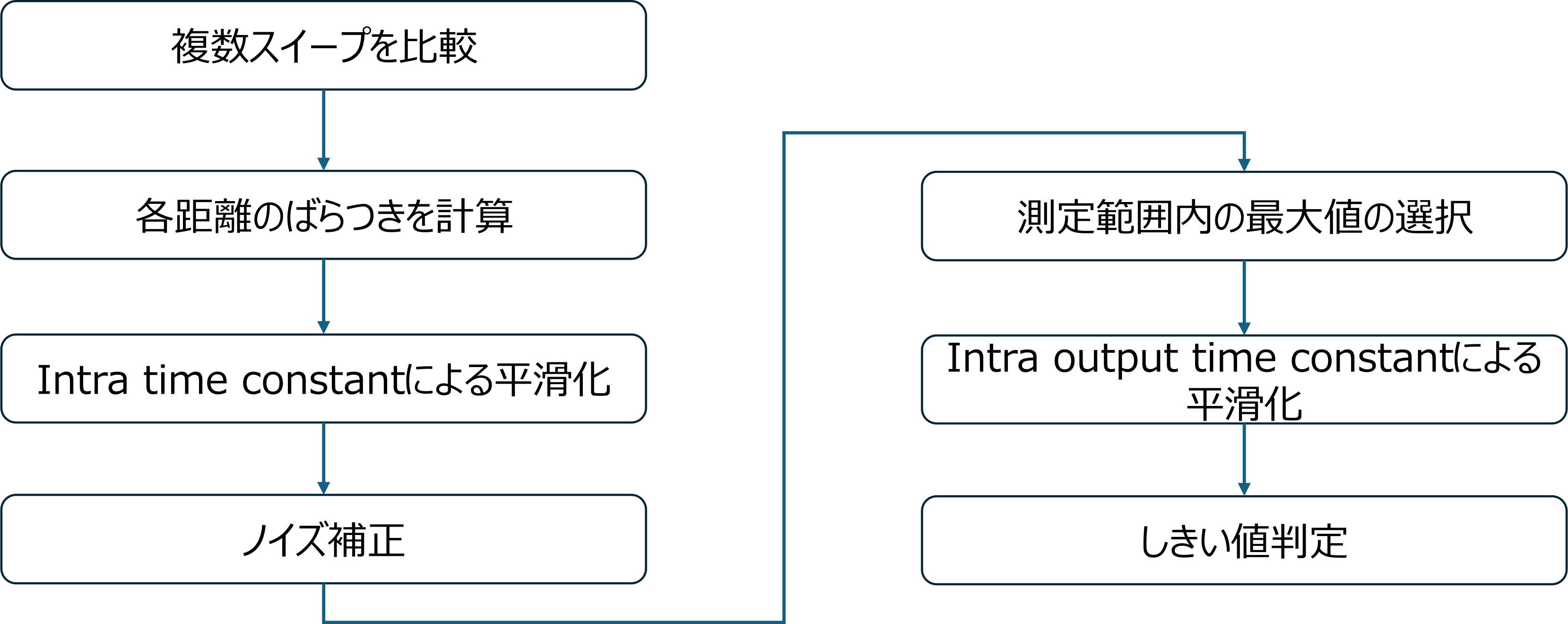
Figure 1: Intra detection processing image
The intra time constant affects the rate of change per distance, while the intra output time constant affects the final output score.
Inter detection parameters
Enable inter(slow) motion detection: Enable/disable slow motion detection.
This setting enables or disables the function that detects slow movements.
Slow movements include very slow actions, breathing while seated, and minute body movements.
The mechanism for detecting slow motion involves averaging multiple sweeps within a single FRAMES to create a representative value for reflection at each distance point. This value is then compared by passing it through FILTERS reacts quickly to changes and FILTERS that tracks slowly. When reflections change slightly due to human body movement or breathing, a difference arises in the output of the two FILTERS. This difference is then normalized based on the noise floor and FILTERS in the temporal direction. If the calculated inter score exceeds a set threshold, motion is detected.
inter detection threshold: Slow motion detection threshold
This is a threshold value used to determine if there is "movement" based on the Inter score calculated from reflection changes across multiple FRAMES. It is used to detect relatively slow movements, such as body movements while seated or subtle changes associated with breathing.
Inter time constant: Time constant of the change in low-speed operation
This parameter smooths the Inter change calculated for each distance. It affects the processing before selecting the final Inter score from within the measurement range.
Inter output time constant: Output time constant of the low-speed motion detection score.
This parameter smooths the final Inter score after selecting the maximum value from the Inter change within the measurement range.
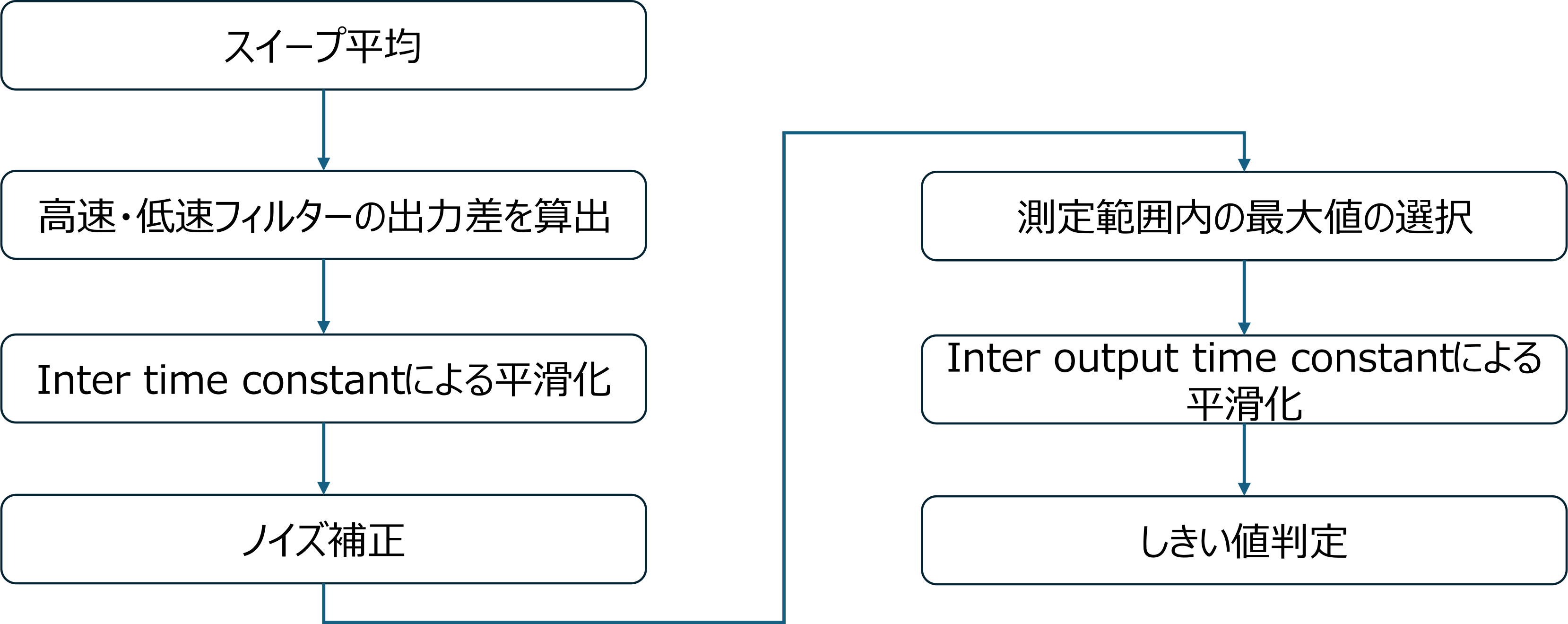
Figure 2 Intermediate detection processing image
The Inter time constant affects the rate of change per distance, while the Inter output time constant affects the final output score.
How to set the detection threshold
The Intra detection threshold and Inter detection threshold are the criteria used to determine whether a particular score indicates "movement." First, check the range of variation in the Intra score and Inter score in an unoccupied state, and then check the scores obtained with anticipated human movement.
The detection threshold should generally be set higher than the score fluctuations that occur when the system is unattended, and lower than the score obtained from the actions of the detected object.
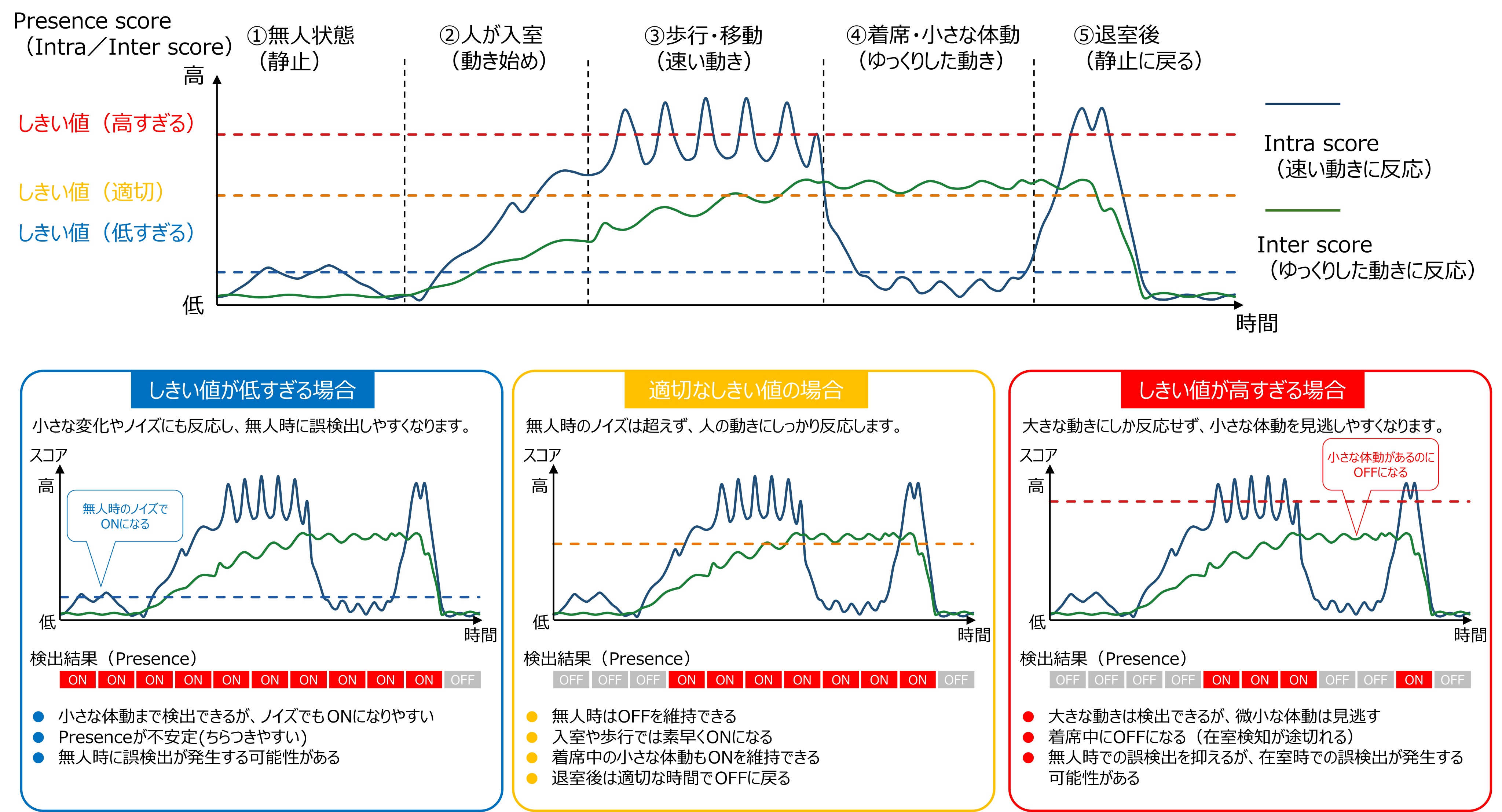
Figure 3: Differences in detection sensitivity based on detection threshold.
Lowering the threshold makes the device more responsive to small movements, but it also makes it easier to detect the movement of surrounding objects and vibrations in the installation area. Conversely, raising the threshold reduces false positives, but it may miss small body movements. Perform multiple measurements in the actual usage environment, both with and without people present, and set a value that can reliably distinguish between the two.
How to set the time constant
Intra/Inter time constant and Intra/Inter output time constant are parameters that adjust the response speed and stability of the score, although they operate at different processing stages.
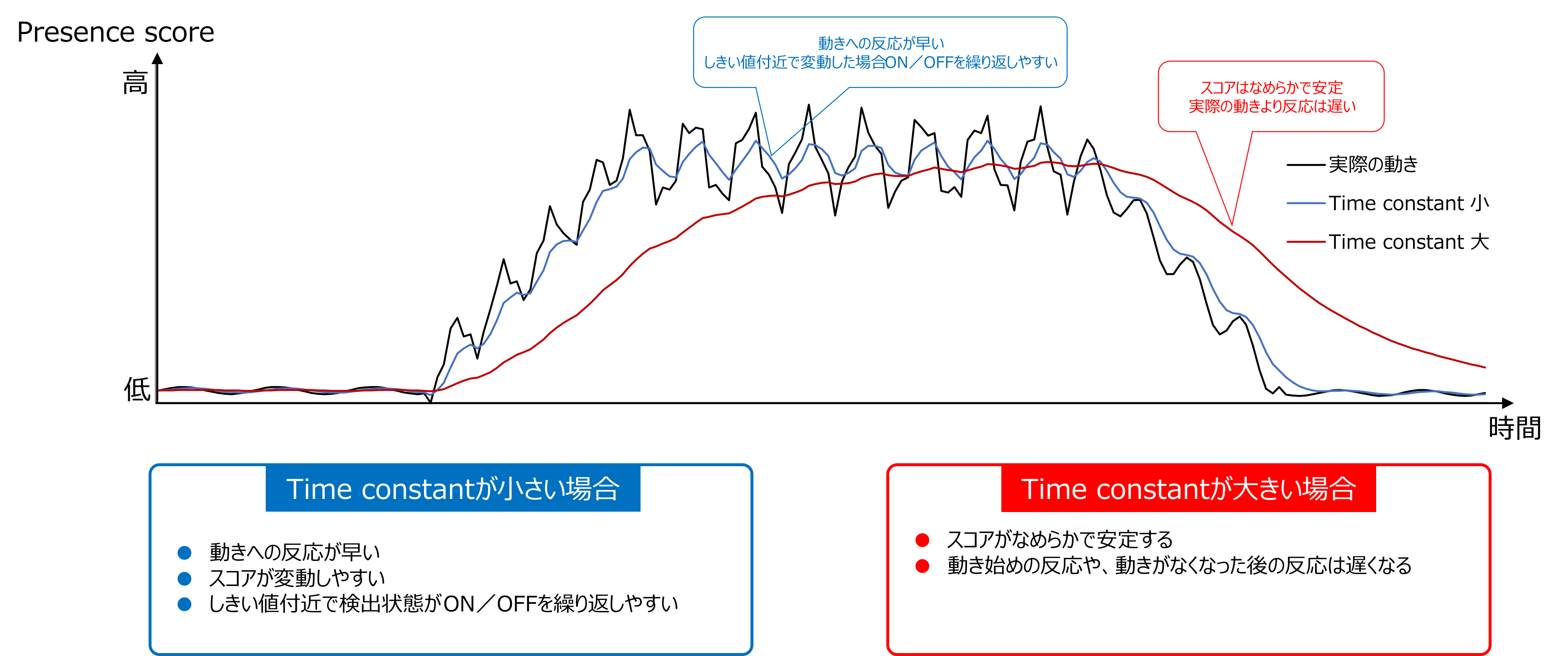
Figure 4 Relationship between response speed and stability due to time constant
Lowering the value allows for faster tracking of score changes, but makes the system more susceptible to instantaneous fluctuations. Increasing the value makes the score more stable, but slows down the initiation and deactivation of detection.
If the detection results change frequently, increase the value; if the response is slow, decrease the value. To ensure you can see the effects of the changes, adjust the time constants one at a time rather than changing multiple time constants at once.
Cutoff frequency: The speed of motion handled by inter-detection.
Inter detection sets the range of motion speeds to be detected using the Inter slow cutoff frequency and Inter fast cutoff frequency.
The Inter slow cutoff frequency sets the boundary for slower-movement detection. Lowering the value makes it easier to detect slower changes, such as breathing or subtle body movements while seated. However, it also makes the system more susceptible to the effects of prolonged environmental changes and slow background fluctuations.
The Inter fast cutoff frequency sets the boundary for the faster side of the motion to be detected. A higher value will reflect faster changes in the Inter score. Relatively fast movements such as walking and approaching are mainly detected using intra detection.
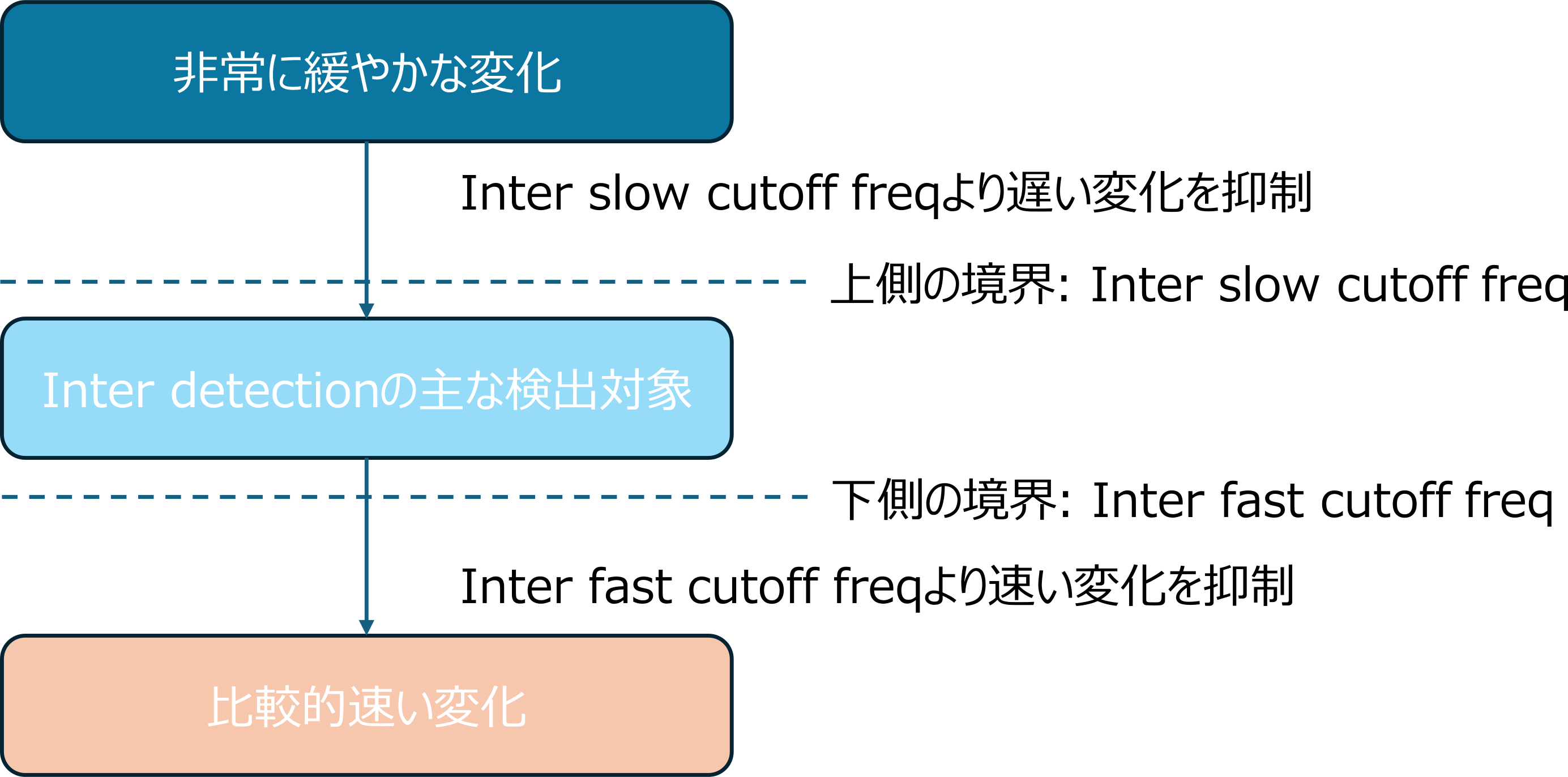
Figure 5 Motion speed and cutoff frequency handled by inter detection
The two cutoff frequencies determine the range of motion speeds in which Inter detection primarily reacts. Since the score can also change due to vibrations at the installation site and movement of surrounding objects, it is necessary to check the measurement range and installation conditions as well, rather than trying to eliminate false detections solely by considering the cutoff frequencies.
Evaluation Method for Presence Detectors
In evaluating the Presence Detector, the evaluation conditions and measurement range are determined first, and measurements are started with OTHERS settings left at their default values. While checking the measurement results, the Intra score, Inter score, and detection threshold are adjusted. If the expected results are not obtained or if it is difficult to make a judgment, the evaluation data is saved and Nexty Electronics is consulted. After the parameters are finalized, the enclosure, mounting method, and installation location are determined, and a final check is performed with the product integrated.
Table 4 Basic evaluation flow of Presence Detector
| 1 | Determine the evaluation criteria. |
|---|---|
| 2 | Set the measurement range and start the measurement. |
| 3 | Adjust Intra score/Inter score and detection threshold. |
| 4 | Save the evaluation data and consult with Nexty Electronics. |
| 5 | Confirm each parameter (repeat step 4 if you cannot confirm them). |
| 6 | Determine the enclosure, mounting method, and installation location. |
| 7 | Final checks are performed with the product installed. |
1. Evaluation Criteria
First, determine the target actions to be detected by the Presence Detector and the criteria for pass/fail judgment. This involves defining the human actions to be detected, the sensor's placement and orientation, the detection distance, and the required response time. For example, the performance characteristics to prioritize will differ depending on the application, such as "quickly detecting when a person enters a room" or "maintaining presence even with small body movements while seated." By pre-determining evaluation conditions, it becomes easier to judge the measurement results and the effects of parameter changes.
Main items to check
- Actions to detect: walking, crossing paths, sitting down, leaving a seat, etc.
- Sensor installation position, height, and orientation
- Detection distance and range
- Acceptable time before detection begins
- Acceptable time to become undetectable after leaving the room
2. Set the measurement range and start the measurement.
Set the required measurement range using Range start and Range end, and start the measurement with OTHERS settings at their default or automatic settings. Limiting the measurement range to the necessary area is important, as setting it too wide may detect reflections from walls or surrounding objects.
Measurements are taken in the following order: entering the room, walking, crossing, sitting, near-stationary, leaving the seat, and leaving the room. Presence judgment, intra score, inter score, and detection distance are recorded. Checks are performed not only in the frontal direction but also in the lateral direction and at the edges of the detection range.
For details on Range start and Range end, see "Parameters related to measurement range and FRAMES".
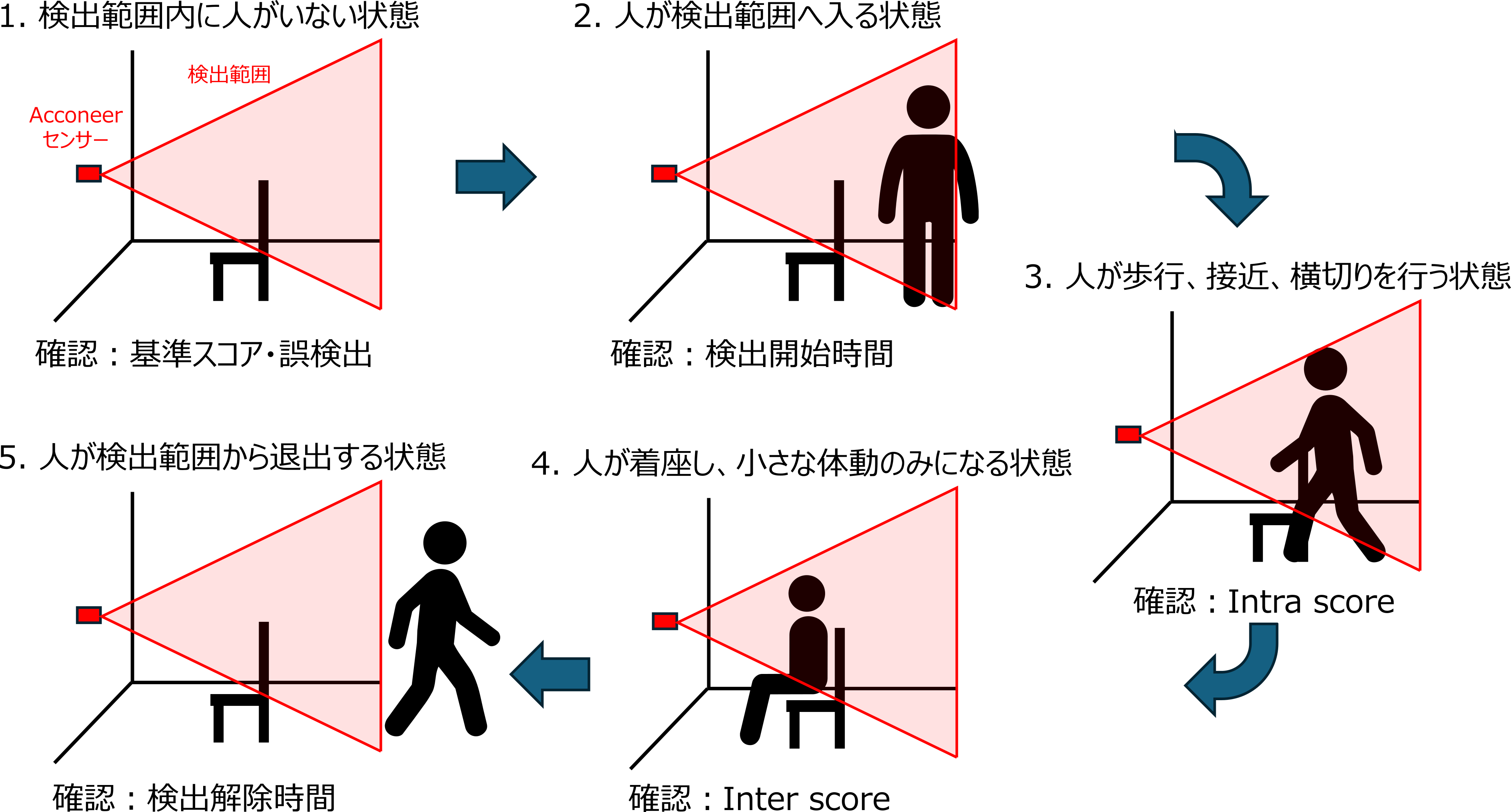
Figure 6: Human movement confirmed during initial setup
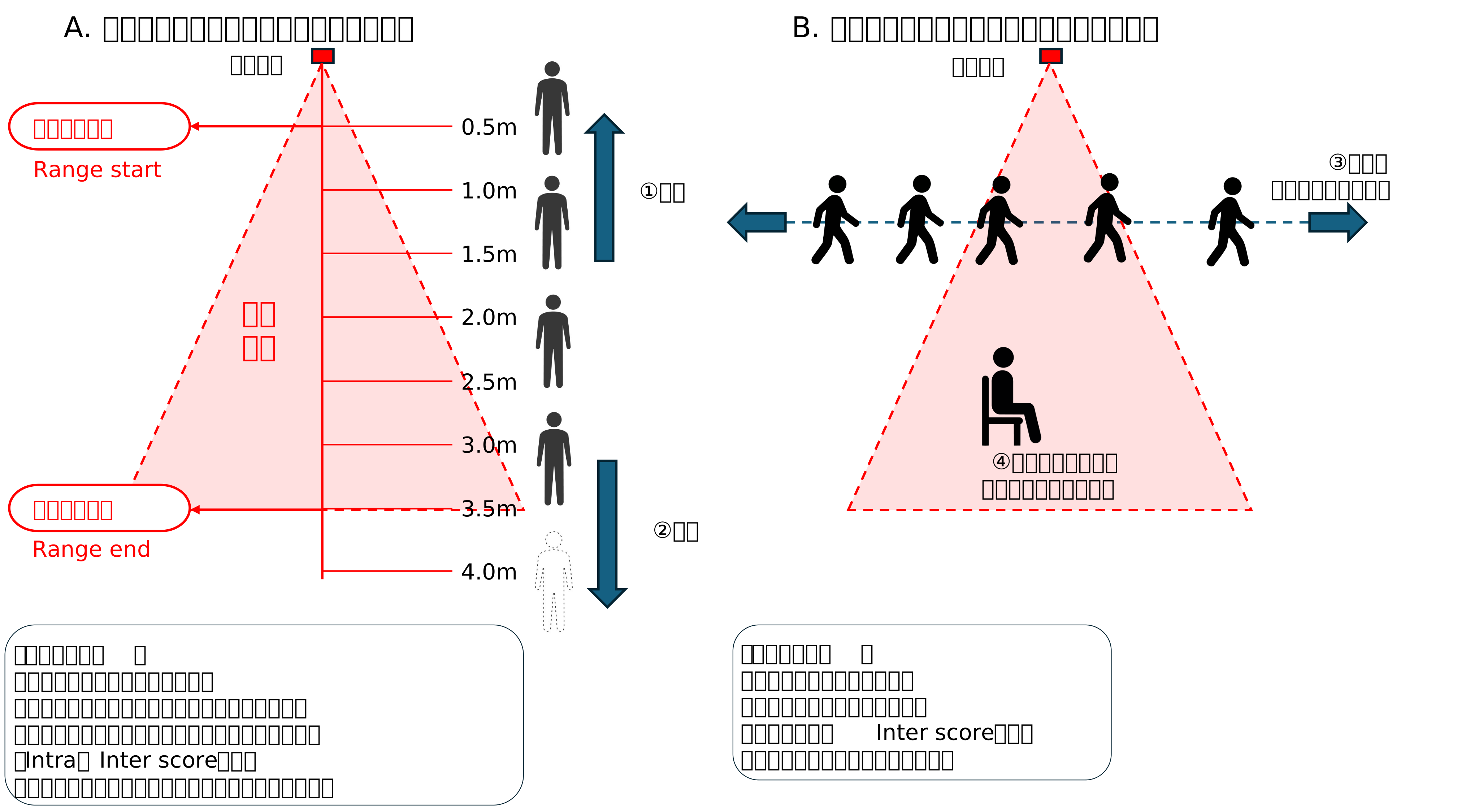
Figure 7: Method for evaluating detection distance and range
The results obtained here will be used as baseline data for comparing parameters before and after subsequent adjustments.
3. Adjust the Intra score/Inter score and detection threshold.
Based on the measurement results, determine which actions the Intra score or Inter score is responding to. If the expected detection results are not obtained, adjust the Intra detection threshold or Inter detection threshold according to the target action.
Table 5: Evaluated behaviors and confirmed presence scores
| The state to be evaluated | The main score to check | Confirmation details |
|---|---|---|
| Entering the room, walking, approaching | Intra score | Can fast movements be detected quickly? |
| Body movements while seated | Inter score | Can it detect slow movements? |
| Nearly stationary | Inter score | Can the detection state be maintained? |
| After leaving the room | Intra/Inter score | Will the score decrease at an appropriate time? |
4. Save the evaluation data and consult with Nexty Electronics.
If you do not obtain the expected results or are unable to determine the adjustment strategy, please save the measurement data in HDF5 format (.h5) using the Exploration Tool. Please also share an installation diagram showing the expected operation and evaluation conditions, as well as photos or videos showing the measurement environment. Based on the information you share, we will consider parameters and installation locations to achieve the expected operation.
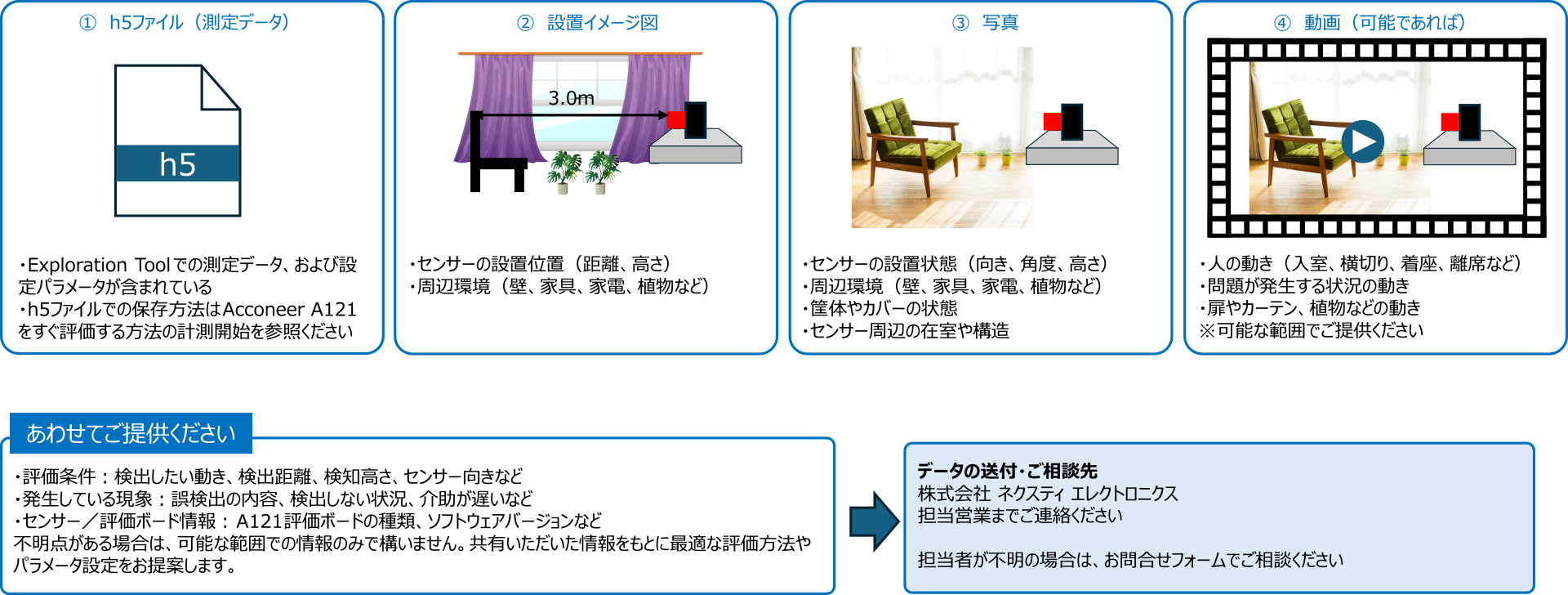
Figure 8: Evaluation information shared during consultations
- For instructions on how to save .h5 files, please refer to the "Start Measurement" section in the related article "How to Quickly Evaluate the Acconeer A121".
5. Determine each parameter.
Based on the measurement results and consultation details, we will determine the range start, range end, detection threshold, time constant, cutoff frequency, etc. If the expected results are not obtained, return to step 4, save the additional data and changes, and consult again.
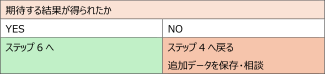
Figure 9 Parameter determination and return destination
6. Determine the enclosure, mounting method, and installation location.
After determining the evaluation parameters, the enclosure, mounting method, installation height, orientation, and positional relationship with surrounding objects are decided.
Even millimeter-wave sensors can sometimes detect the movement of doors, curtains, plants, peripheral equipment, and vibrations at the installation site as human movement. If false detections are confirmed, review the mounting method, installation location, and measurement range before changing the parameters.
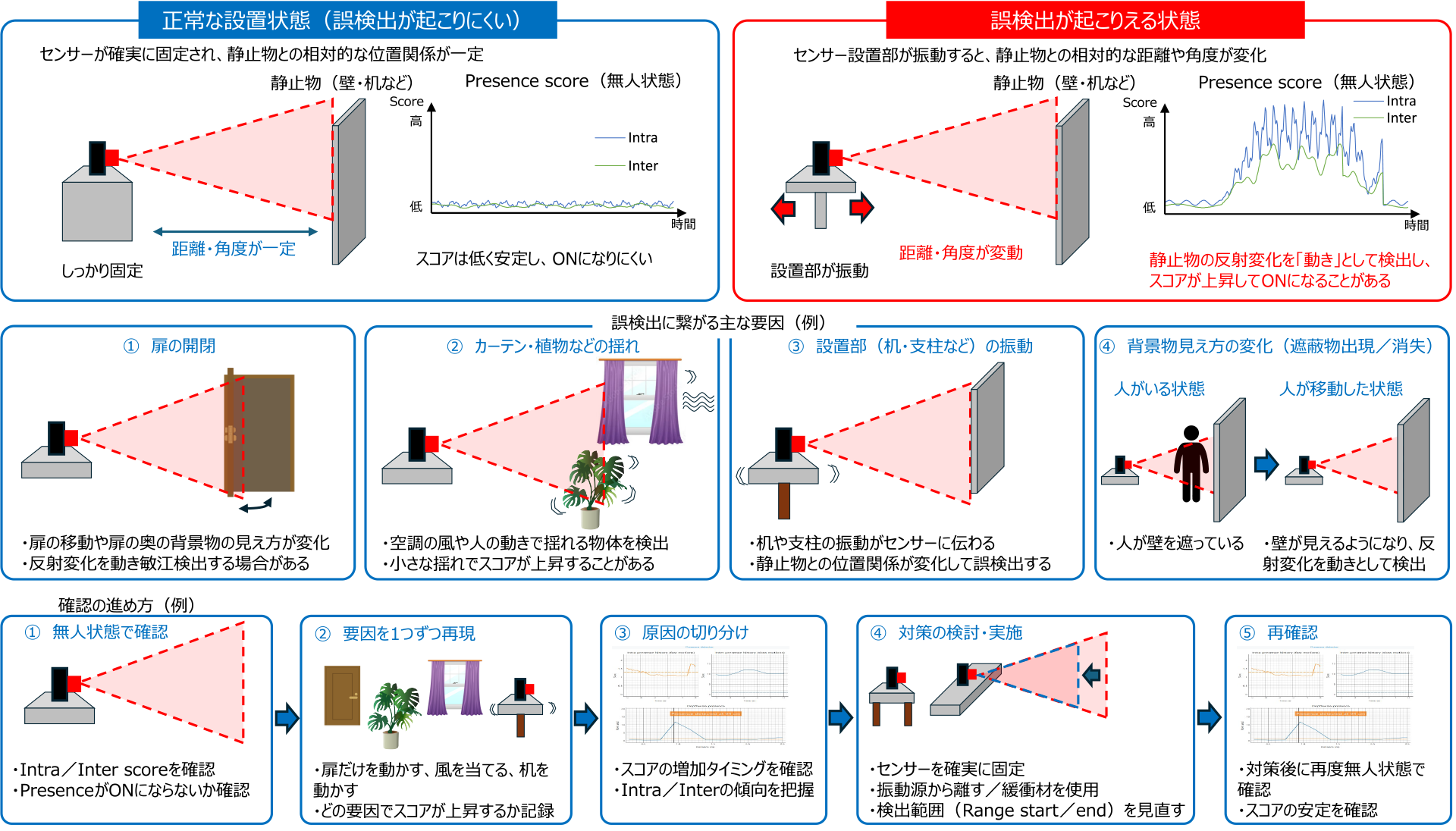
Figure 10 False positive factors and verification procedure
In addition to false positives, we also check for "detection gaps," where the intended human movement is not detected. In particular, the score may appear differently depending on whether the movement is in the front or lateral direction relative to the sensor, at the edge of the detection range, or when the person is nearly stationary while seated. We check the intra score and inter score under each condition to evaluate whether the detection state can be maintained.
7. Perform a final check with the product installed.
The sensor is incorporated into the product using the finalized housing, mounting method, and installation location, and a final check is performed according to the evaluation conditions defined in Step 1. Detection distance, intra score, inter score, response time, false positives, and missed detections are checked, and the results are recorded.
If a problem is identified, first review the enclosure, mounting method, installation location, and measurement range. If parameter readjustment is necessary, save the changes and evaluation data, and then re-verify from step 4.
| Detection distance | Intra score | Inter score | Response time | False positive | Missed detection |
|---|---|---|---|---|---|
| □Confirm | □Confirm | □Confirm | □Confirm | □Confirm | □Confirm |
Figure 11 Final check items in the product assembly state
Summary
This article explained the basic Presence Detector function, its application Smart Presence, key parameters, and evaluation procedures for human presence detection using the Acconeer A121.
When evaluating a presence detector, it's crucial to set the required measurement range and acquire baseline data without changing multiple parameters from the start. Then, check the scores under unoccupied and occupied conditions, and adjust only the items related to the symptoms one by one. Since the final performance will vary depending on the enclosure and installation conditions, please verify it in the product's integrated state.
Nexty Electronics provides support for selecting, initial setup, evaluation methods, installation conditions, and reviewing acquired HDF5 format (.h5) measurement data for Acconeer products. If you have difficulty making a decision during the evaluation process, please Inquiry with installation diagrams and photos/videos of the measurement environment.
Related Info
RF (Radio Frequency) Technology Column
![[Millimeter-wave sensor] How to quickly evaluate the Acconeer A121 - From installing the Exploration Tool to starting measurements -](/uploads/media_files/pcr_thumbnail-7992261369.jpg)