

概要
この記事では、CIFAR-10データセットを使⽤してTensorFlowモデルを学習し、そのモデルを量⼦化し、Raspberry Pi 3での推論に使⽤する⽅法を説明します。
画像認識を活⽤するシーンが広がる中で、エッジデバイスによるリアルタイムでの認識処理が求められるユースケースが増加しています。
ネクスティ エレクトロニクスではさまざまな画像認識・AIに関連するエッジデバイスを取り扱う中で画像認識・AIに関する取り組みを⾏っていますが、今回その取り組みの中の⼀つのサンプルとして、Google Colaboratoryを活⽤してモデルのトレーニングから量⼦化までを⾏い、最終的にRaspberry Pi 3で効率的な推論を実現する⼀連のプロセスを紹介します。
Google Colaboratoryの環境設定
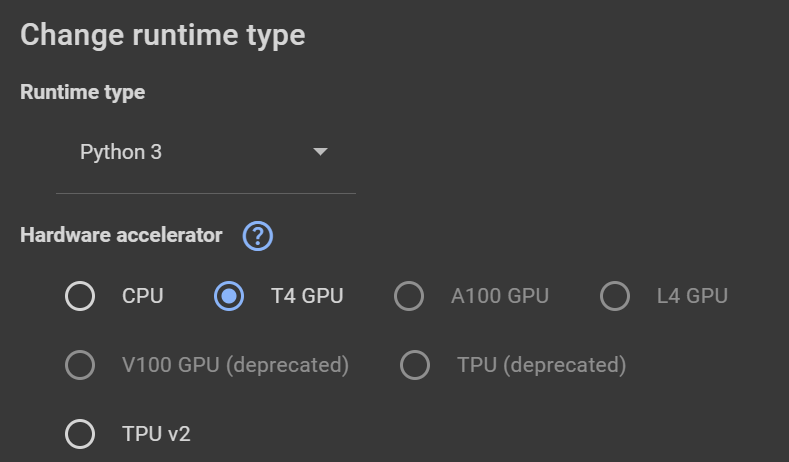
Menuの中からRuntimeChange runtime typeを選択し、T4 GPUを選択しました。
Google Driveのマウントとライブラリのインストール
まず、Google Driveをマウントし、必要なライブラリをインストールします。
(初回実⾏時にはGoogleドライブとの連携をするウィンドウが表⽰されるので、Googleアカウントでログインののち、接続をしてください。)
|
from google.colab import drive rive.mount('/content/gdrive') !pip install tensorflow==2.15.0 |
|---|
必要なライブラリのインポート
次に、必要なライブラリをインポートします。
|
import matplotlib.pyplot as plt import numpy as np import time import datetime from sklearn.metrics import accuracy_score, precision_score, recall_score, f1_score import keras from keras.datasets import cifar10 from keras.applications import VGG16 from keras.layers import Dense, Flatten from keras.models import Model from keras.utils import to_categorical from keras.optimizers import Adam import tensorflow as tf from tensorflow.keras import Input from tensorflow.keras.layers import Conv2D, MaxPooling2D, Flatten, Dense |
|---|
各モジュールのバージョン確認
|
print(f"Keras version: {keras.__version__}") print(f"TensorFlow version: {tf.__version__}") print(f"scikit-learn version: {sklearn.__version__}") print(f"matplotlib version: {matplotlib.__version__}") print(f"NumPy version: {np.__version__}") |
|---|
- Keras version: 2.15.0
- TensorFlow version: 2.15.0
- scikit-learn version: 1.2.2
- matplotlib version: 3.7.1
- NumPy version: 1.25.2
CIFAR-10 データセットの読み込みと前処理
CIFAR-10データセットを読み込み、前処理を⾏います。
|
# Load CIFAR10 data (train_images, train_labels), (test_images, test_labels) = cifar10.load_data() # Convert class vectors to binary class matrices. train_labels = to_categorical(train_labels, 10) test_labels = to_categorical(test_labels, 10) # Normalize pixel values to be between 0 and 1 train_images, test_images = train_images / 255.0, test_images / 255.0 |
|---|
モデルの選択と構築
VGG16を使⽤するか、カスタムモデルを使⽤するかを選択します。
この例ではあらかじめ⽤意されているVGG16モデルを使⽤しています。
|
use_vgg16 = True # This is the flag. If it is True, VGG16 is used. Otherwise, your custom model is used. model_name = "" # 現在の⽇時を取得 now = datetime.datetime.now() if use_vgg16: # VGG16 Model model_name = "vgg_16" + now.strftime("%Y%m%d_%H%M%S") baseModel = VGG16(weights="imagenet", include_top=False, input_shape=(32,32, 3)) headModel = baseModel.output headModel = Flatten(name="flatten")(headModel) headModel = Dense(512, activation="relu")(headModel) headModel = Dense(10, activation="softmax")(headModel) model = Model(inputs=baseModel.input, outputs=headModel) model.compile(optimizer=Adam(), loss='categorical_crossentropy', metrics= ['accuracy']) else: # Custom Model model_name = "custom_model" + now.strftime("%Y%m%d_%H%M%S") input_tensor = Input(shape=(32, 32, 3)) # Here you can manually change the number of layers, filters, kernel sizes etc. x = Conv2D(64, (3, 3), padding='same', activation='relu')(input_tensor) x = Conv2D(64, (3, 3), padding='same', activation='relu')(x) x = MaxPooling2D((2, 2))(x) x = Conv2D(128, (3, 3), padding='same', activation='relu')(x) x = Conv2D(128, (3, 3), padding='same', activation='relu')(x) x = MaxPooling2D((2, 2))(x) x = Conv2D(256, (3, 3), padding='same', activation='relu')(x) x = Conv2D(256, (3, 3), padding='same', activation='relu')(x) x = MaxPooling2D((2, 2))(x) x = Flatten(name="flatten")(x) x = Dense(512, activation="relu")(x) output_tensor = Dense(10, activation="softmax")(x) # Create the model model = Model(inputs=input_tensor, outputs=output_tensor) model.summary() |
|---|
|
_________________________________________________________________ Layer (type) Output Shape Param # ================================================================= input_3 (InputLayer) [(None, 32, 32, 3)] 0 block1_conv1 (Conv2D) (None, 32, 32, 64) 1792 block1_conv2 (Conv2D) (None, 32, 32, 64) 36928 block1_pool (MaxPooling2D) (None, 16, 16, 64) 0 block2_conv1 (Conv2D) (None, 16, 16, 128) 73856 block2_conv2 (Conv2D) (None, 16, 16, 128) 147584 block2_pool (MaxPooling2D) (None, 8, 8, 128) 0 block3_conv1 (Conv2D) (None, 8, 8, 256) 295168 block3_conv2 (Conv2D) (None, 8, 8, 256) 590080 block3_conv3 (Conv2D) (None, 8, 8, 256) 590080 block3_pool (MaxPooling2D) (None, 4, 4, 256) 0 block4_conv1 (Conv2D) (None, 4, 4, 512) 1180160 block4_conv2 (Conv2D) (None, 4, 4, 512) 2359808 block4_conv3 (Conv2D) (None, 4, 4, 512) 2359808 block4_pool (MaxPooling2D) (None, 2, 2, 512) 0 block5_conv1 (Conv2D) (None, 2, 2, 512) 2359808 block5_conv2 (Conv2D) (None, 2, 2, 512) 2359808 block5_conv3 (Conv2D) (None, 2, 2, 512) 2359808 block5_pool (MaxPooling2D) (None, 1, 1, 512) 0 flatten (Flatten) (None, 512) 0 dense_4 (Dense) (None, 512) 262656 dense_5 (Dense) (None, 10) 5130 ================================================================= Total params: 14982474 (57.15 MB) Trainable params: 14982474 (57.15 MB) Non-trainable params: 0 (0.00 Byte) _________________________________________________________________ |
|---|
モデルの学習:2 Epochで実験
モデルをコンパイルし、学習を⾏います。
先に、Epochを2にして、あまり精度が⾼くないと思われる条件で学習を試します。
|
# Training epochs=2 model.compile(optimizer=Adam(), loss='categorical_crossentropy', metrics= ['accuracy']) history = model.fit(train_images, train_labels, batch_size=64, epochs=epochs, validation_data=(test_images, test_labels)) |
|---|
- 学習ログ抜粋
|
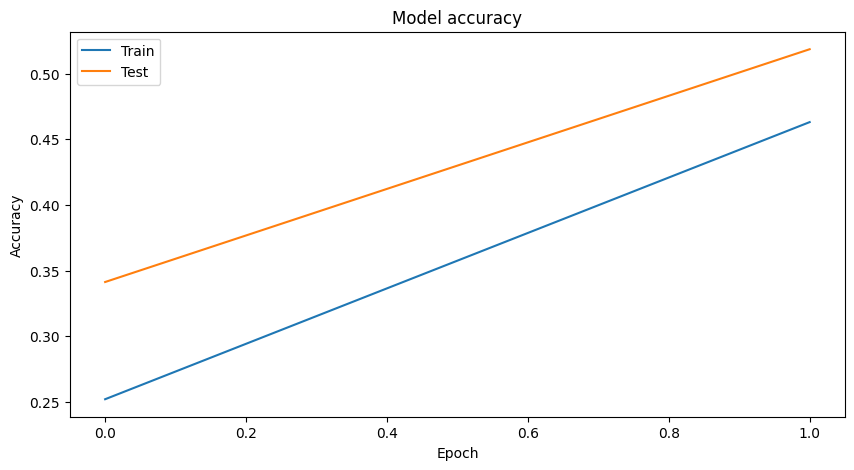
Epoch 1/2 782/782 [==============================]- 42s 41ms/step - loss: 1.8300 - accuracy: 0.2521 - val_loss: 1.6348 - val_accuracy: 0.3413 Epoch 2/2 782/782 [==============================] - 29s 38ms/step - loss: 1.3756 - accuracy: 0.4630 - val_loss: 1.3297 - val_accuracy: 0.5185 |
|---|
トレーニング結果の可視化
|
# Visualize Training Graph # Plotting the accuracy plt.figure(figsize=(10,5)) plt.plot(history.history['accuracy']) plt.plot(history.history['val_accuracy']) plt.title('Model accuracy') plt.ylabel('Accuracy') plt.xlabel('Epoch') plt.legend(['Train', 'Test'], loc='upper left') plt.show() # Plotting the loss plt.figure(figsize=(10,5)) plt.plot(history.history['loss']) plt.plot(history.history['val_loss']) plt.title('Model loss') plt.ylabel('Loss') plt.xlabel('Epoch') plt.legend(['Train', 'Test'], loc='upper left') plt.show() |
|---|
モデルの評価と予測
|
# Predictions class_names = ['airplane', 'automobile', 'bird', 'cat', 'deer', 'dog', 'frog', 'horse', 'ship', 'truck'] # Start time record start_time = time.time() # Predictions predictions = model.predict(test_images) # End time record end_time = time.time() # Convert predictions and test labels to 1D arrays test_predictions = np.argmax(predictions, axis=1) # <-- Here we should use 'predictions' test_labels_1d = np.argmax(test_labels, axis=1) # Calculate accuracy accuracy = accuracy_score(test_labels_1d, test_predictions) # Calculate precision precision = precision_score(test_labels_1d, test_predictions, average='weighted') # Calculate recall recall = recall_score(test_labels_1d, test_predictions, average='weighted') # Calculate F1 score f1 = f1_score(test_labels_1d, test_predictions, average='weighted') # Count the number of correct predictions correct_predictions = np.sum(np.argmax(test_labels, axis=1) == np.argmax(predictions, axis=1)) # Calculate total inference time total_inference_time = end_time - start_time # Calculate inference time per image inference_time_per_image = total_inference_time / test_images.shape[0] # Calculate frames per second (fps) fps = 1 / inference_time_per_image # Calculate accuracy test_accuracy = correct_predictions / test_images.shape[0] # Get the number of model parameters num_params = model.count_params() print("\033[92m") print("---Tensorflow") print(f"Total inference time: {total_inference_time:.2f} seconds") print(f"Inference time per image: {inference_time_per_image:.6f} seconds") print(f"Inference speed: {fps:.2f} frames per second") print(f"Test accuracy: {test_accuracy * 100:.2f}%") print(f"Correct predictions: {correct_predictions}/{test_images.shape[0]}") print(f"Accuracy: {accuracy}") print(f"Precision: {precision}") print(f"Recall: {recall}") print(f"F1 Score: {f1}") print(f"Number of parameters: {num_params}") print(f"\033[0m") |
|---|
- Total inference time: 3.62 seconds
- Inference time per image: 0.000362 seconds
- Inference speed: 2762.24 frames per second
- Test accuracy: 51.85%
- Correct predictions: 5185/10000
- Accuracy: 0.5185
- Precision: 0.5460565026512546
- Recall: 0.5185
- F1 Score: 0.5121520088704362
- Number of parameters: 14982474
モデルの評価指標:英語版
以下の数式は、評価指標の計算⽅法を⽰しています。
- 精度(Accuracy)

- 適合率(Precision)

- 再現率(Recall)

- F1スコア(F1 Score)

モデルの評価指標:⽇本語版
以下の数式は、評価指標の計算⽅法を⽰しています。
- 精度(Accuracy)
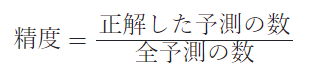
- 適合率(Precision)
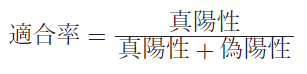
- 再現率(Recall)
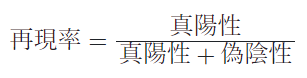
- F1スコア(F1 Score)

予測結果の可視化
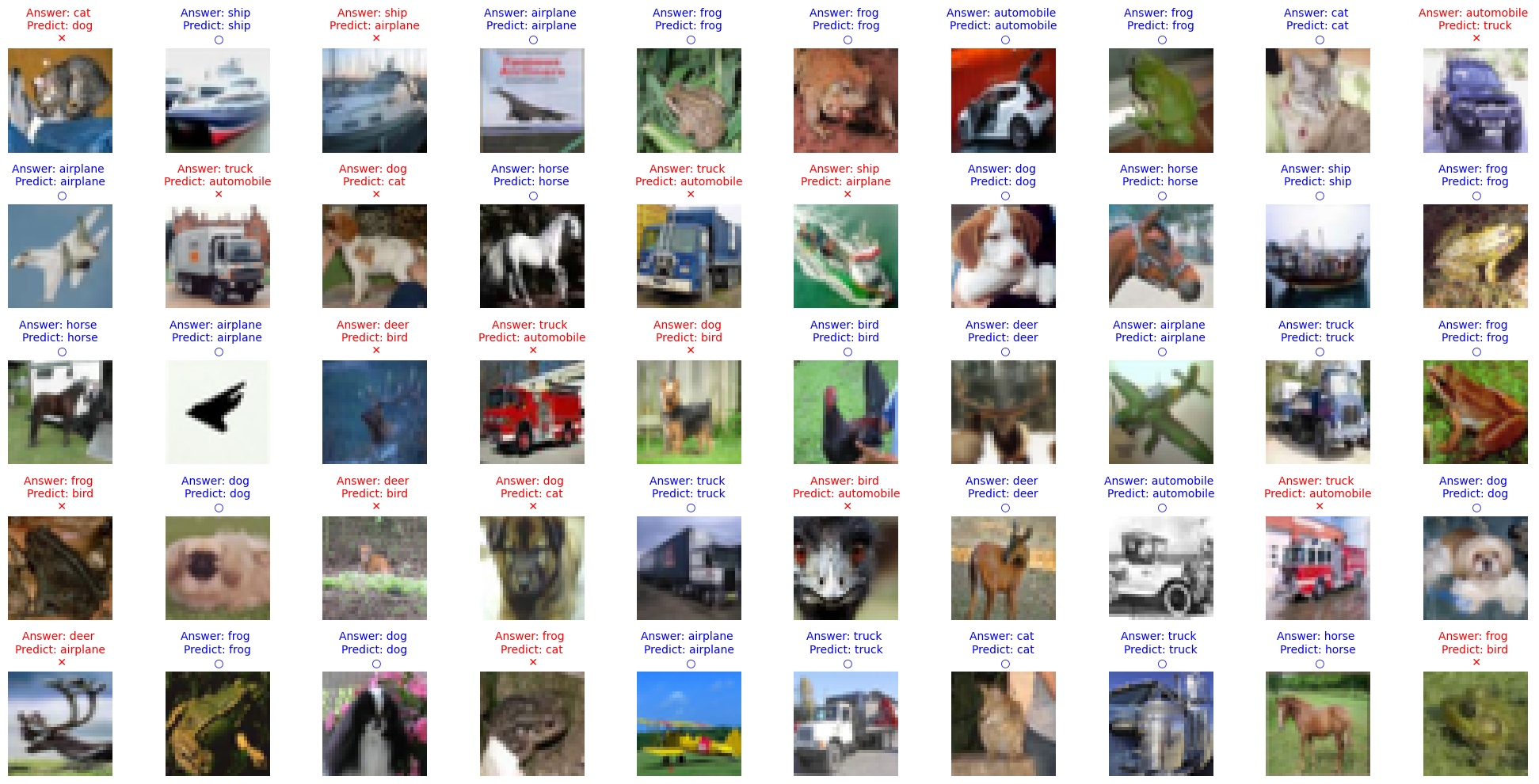
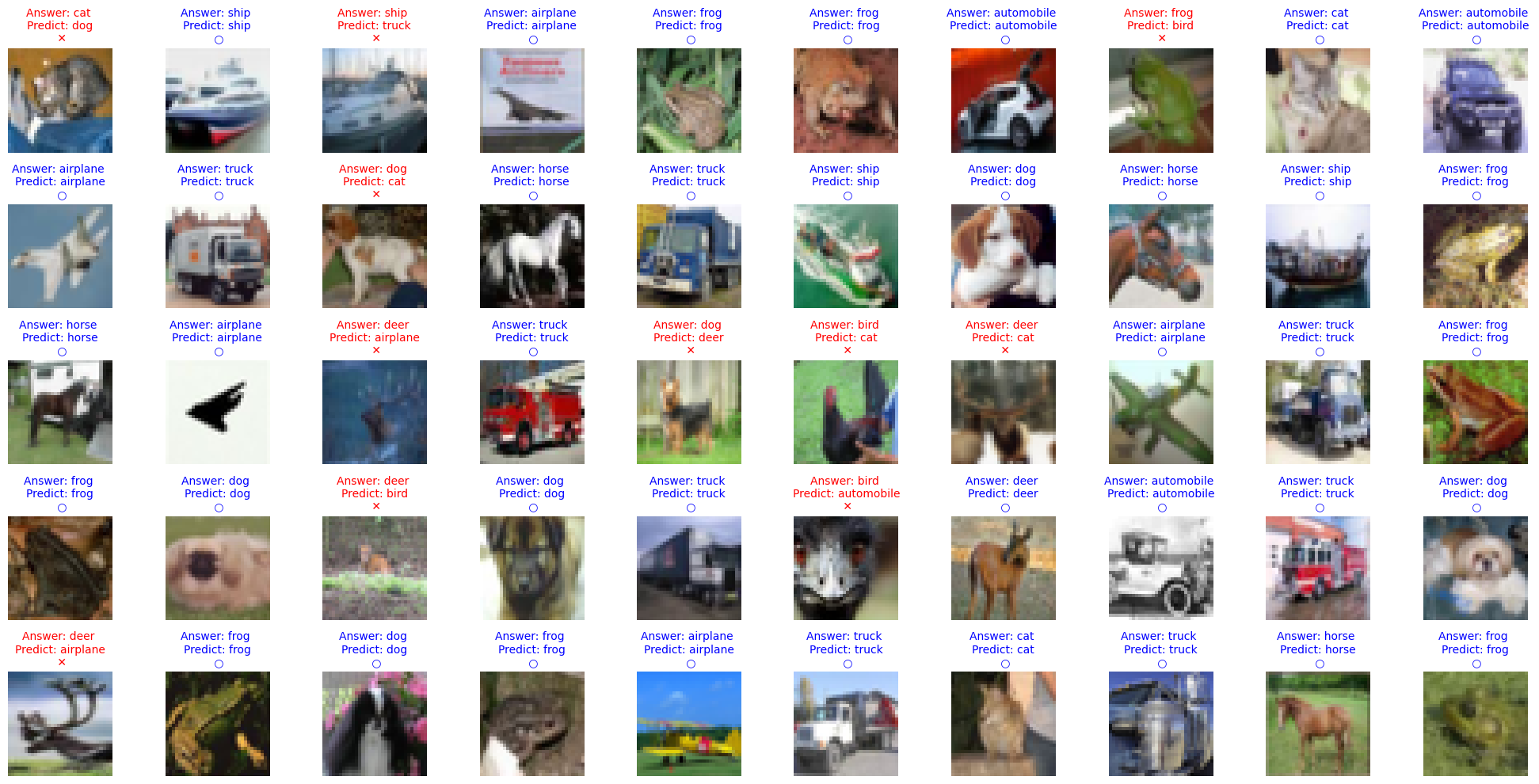
正確な正解の数は上記のCorrect predictions: 5185/10000ですが、画像形式でも少し確認をしてみます。
テストデータからランダムに画像を表⽰し、正解と予測を⽐較します。
|
num_rows = 5 num_cols = 10 num_images = num_rows*num_cols fig, axes = plt.subplots(num_rows, num_cols, figsize=(20, 2 * num_rows)) # Adjust the figure size axes = axes.ravel() for i in np.arange(0, num_images): axes[i].imshow(test_images[i]) if np.argmax(test_labels[i]) == np.argmax(predictions[i]): axes[i].set_title("Answer: %s \nPredict: %s\n \u25CB" % (class_names[np.argmax(test_labels[i])], class_names[np.argmax(predictions[i])]), fontsize=10, color='blue') else: axes[i].set_title("Answer: %s \nPredict: %s\n \u2715" % (class_names[np.argmax(test_labels[i])], class_names[np.argmax(predictions[i])]), fontsize=10, color='red') axes[i].axis('off') plt.tight_layout() # Apply tight_layout |
|---|
モデルの学習:20 Epochで実験
|
# Training epochs=20 model.compile(optimizer=Adam(), loss='categorical_crossentropy', metrics= ['accuracy']) history = model.fit(train_images, train_labels, batch_size=64, epochs=epochs, validation_data=(test_images, test_labels)) |
|---|
- 学習ログ抜粋
|
Epoch 1/20 782/782 [==============================] - 49s 51ms/step - loss: 1.7404 - accuracy: 0.3044 - val_loss: 1.2784 - val_accuracy: 0.5199 Epoch 2/20 782/782 [==============================] - 33s 42ms/step - loss: 1.1353 - accuracy: 0.5870 - val_loss: 1.0319 - val_accuracy: 0.6459 Epoch 3/20 782/782 [==============================] - 34s 44ms/step - loss: 0.8738 - accuracy: 0.7014 - val_loss: 0.8739 - val_accuracy: 0.7087 Epoch 4/20 782/782 [==============================] - 38s 49ms/step - loss: 0.7150 - accuracy: 0.7603 - val_loss: 0.7924 - val_accuracy: 0.7269 Epoch 5/20 782/782 [==============================] - 31s 40ms/step - loss: 0.6050 - accuracy: 0.8014 - val_loss: 0.8037 - val_accuracy: 0.7560 Epoch 6/20 782/782 [==============================] - 31s 40ms/step - loss: 0.5321 - accuracy: 0.8285 - val_loss: 0.6816 - val_accuracy: 0.7851 Epoch 7/20 782/782 [==============================] - 31s 40ms/step - loss: 0.4607 - accuracy: 0.8502 - val_loss: 0.6683 - val_accuracy: 0.7978 Epoch 8/20 782/782 [==============================] - 32s 41ms/step - loss: 0.4130 - accuracy: 0.8666 - val_loss: 0.6847 - val_accuracy: 0.7874 Epoch 9/20 782/782 [==============================] - 32s 41ms/step - loss: 0.3603 - accuracy: 0.8854 - val_loss: 0.6863 - val_accuracy: 0.7980 Epoch 10/20 782/782 [==============================] - 32s 41ms/step - loss: 0.3283 - accuracy: 0.8956 - val_loss: 0.7302 - val_accuracy: 0.8040 Epoch 11/20 782/782 [==============================] - 31s 40ms/step - loss: 0.2775 - accuracy: 0.9118 - val_loss: 0.7026 - val_accuracy: 0.7987 Epoch 12/20 782/782 [==============================] - 31s 40ms/step - loss: 0.2710 - accuracy: 0.9124 - val_loss: 0.7211 - val_accuracy: 0.8044 Epoch 13/20 782/782 [==============================] - 31s 40ms/step - loss: 0.2417 - accuracy: 0.9235 - val_loss: 0.7624 - val_accuracy: 0.7863 Epoch 14/20 782/782 [==============================] - 32s 41ms/step - loss: 0.2163 - accuracy: 0.9337 - val_loss: 0.8034 - val_accuracy: 0.8008 Epoch 15/20 782/782 [==============================] - 31s 40ms/step - loss: 0.2113 - accuracy: 0.9341 - val_loss: 0.8858 - val_accuracy: 0.7767 Epoch 16/20 782/782 [==============================] - 31s 39ms/step - loss: 0.1905 - accuracy: 0.9423 - val_loss: 0.7814 - val_accuracy: 0.8070 Epoch 17/20 782/782 [==============================] - 31s 40ms/step - loss: 0.1669 - accuracy: 0.9483 - val_loss: 0.8559 - val_accuracy: 0.8057 Epoch 18/20 782/782 [==============================] - 31s 40ms/step - loss: 0.1532 - accuracy: 0.9539 - val_loss: 0.8492 - val_accuracy: 0.8051 Epoch 19/20 782/782 [==============================] - 31s 40ms/step - loss: 0.1540 - accuracy: 0.9534 - val_loss: 0.8842 - val_accuracy: 0.7914 Epoch 20/20 782/782 [==============================] - 32s 41ms/step - loss: 0.1515 - accuracy: 0.9539 - val_loss: 0.9053 - val_accuracy: 0.7988 |
|---|
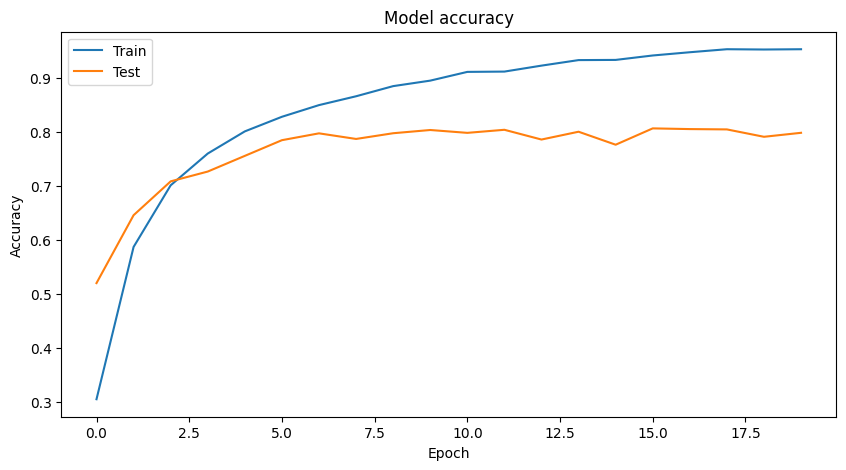
トレーニング結果の可視化
学習過程の正確性と損失をプロットします。
|
# Visualize Training Graph # Plotting the accuracy plt.figure(figsize=(10,5)) plt.plot(history.history['accuracy']) plt.plot(history.history['val_accuracy']) plt.title('Model accuracy') plt.ylabel('Accuracy') plt.xlabel('Epoch') plt.legend(['Train', 'Test'], loc='upper left') plt.show() # Plotting the loss plt.figure(figsize=(10,5)) plt.plot(history.history['loss']) plt.plot(history.history['val_loss']) plt.title('Model loss') plt.ylabel('Loss') plt.xlabel('Epoch') plt.legend(['Train', 'Test'], loc='upper left') plt.show() |
|---|
モデルの評価と予測
テストデータを⽤いてモデルの性能を評価し、予測結果を出⼒します。
|
# Predictions class_names = ['airplane', 'automobile', 'bird', 'cat', 'deer', 'dog', 'frog', 'horse', 'ship', 'truck'] # Start time record start_time = time.time() # Predictions predictions = model.predict(test_images) # End time record end_time = time.time() # Convert predictions and test labels to 1D arrays test_predictions = np.argmax(predictions, axis=1) test_labels_1d = np.argmax(test_labels, axis=1) # Calculate accuracy accuracy = accuracy_score(test_labels_1d, test_predictions) # Calculate precision precision = precision_score(test_labels_1d, test_predictions, average='weighted') # Calculate recall recall = recall_score(test_labels_1d, test_predictions, average='weighted') # Calculate F1 score f1 = f1_score(test_labels_1d, test_predictions, average='weighted') # Count the number of correct predictions correct_predictions = np.sum(np.argmax(test_labels, axis=1) == np.argmax(predictions, axis=1)) # Calculate total inference time total_inference_time = end_time - start_time # Calculate inference time per image inference_time_per_image = total_inference_time / test_images.shape[0] # Calculate frames per second (fps) fps = 1 / inference_time_per_image # Calculate accuracy test_accuracy = correct_predictions / test_images.shape[0] # Get the number of model parameters num_params = model.count_params() print("\033[92m") print("---Tensorflow") print(f"Total inference time: {total_inference_time:.2f} seconds") print(f"Inference time per image: {inference_time_per_image:.6f} seconds") print(f"Inference speed: {fps:.2f} frames per second") print(f"Test accuracy: {test_accuracy * 100:.2f}%") print(f"Correct predictions: {correct_predictions}/{test_images.shape[0]}") print(f"Accuracy: {accuracy}") print(f"Precision: {precision}") print(f"Recall: {recall}") print(f"F1 Score: {f1}") print(f"Number of parameters: {num_params}") print("\033[0m") |
|---|
- Total inference time: 3.44 seconds
- Inference time per image: 0.000344 seconds
- Inference speed: 2910.39 frames per second
- Test accuracy: 79.88%
- Correct predictions: 7988/10000
- Accuracy: 0.7988
- Precision: 0.8079718674357317
- Recall: 0.7988
- F1 Score: 0.8000619454577802
- Number of parameters: 14982474
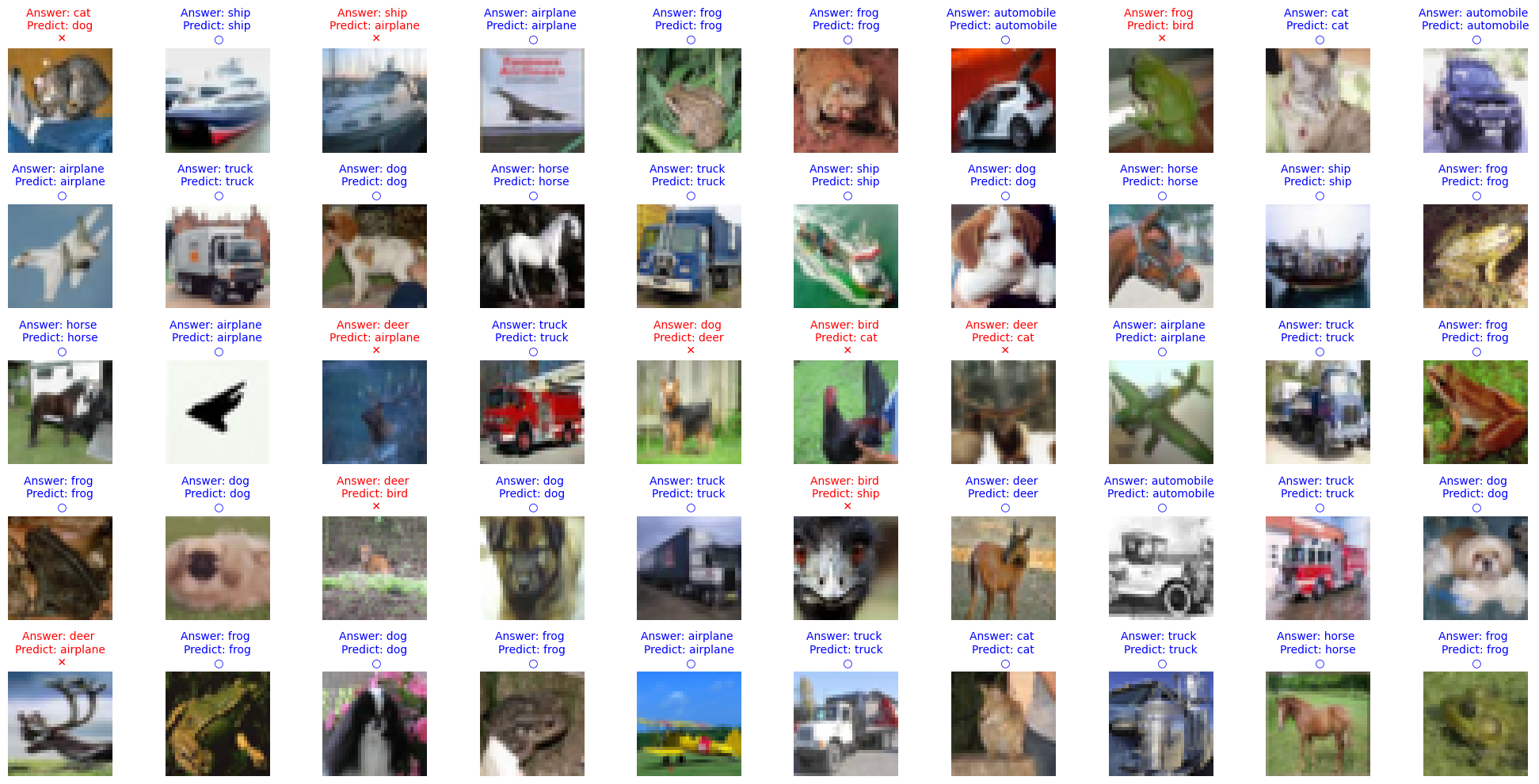
予測結果の可視化
テストデータからランダムに画像を表⽰し、正解と予測を⽐較します。
|
num_rows = 5 num_cols = 10 num_images = num_rows*num_cols fig, axes = plt.subplots(num_rows, num_cols, figsize=(20, 2 * num_rows)) # Adjust the figure size axes = axes.ravel() for i in np.arange(0, num_images): axes[i].imshow(test_images[i]) if np.argmax(test_labels[i]) == np.argmax(predictions[i]): axes[i].set_title("Answer: %s \nPredict: %s\n \u25CB" % (class_names[np.argmax(test_labels[i])], class_names[np.argmax(predictions[i])]), fontsize=10, color='blue') else: axes[i].set_title("Answer: %s \nPredict: %s\n \u2715" % (class_names[np.argmax(test_labels[i])], class_names[np.argmax(predictions[i])]), fontsize=10, color='red') axes[i].axis('off') plt.tight_layout() # Apply tight_layout |
|---|
Epoch2とEpoch20の⽐較
| 指標 | Epoch2 | Epoch20 |
|---|---|---|
| 精度(Accuracy) | 0.5185(51.85%) | 0.7988(79.88%) |
| Precision(適合率) | 0.5461 | 0.8080 |
| Recall(再現率) | 0.5185 | 0.7988 |
| F1スコア | 0.5122 | 0.8001 |
- Accuracy
Epoch2の精度は51.85%であり、これはモデルがランダムに予測しているわけではないものの、ほぼ半分の精度であることを⽰しています。
Epoch20では79.88%の精度に向上しており、モデルがより正確に分類できるようになったことがわかります。
- Precision
Precisionは正しく分類された正例の割合を⽰します。
Epoch2では0.5461でしたが、Epoch20では0.8080に向上しています。
これはモデルが正例をより正確に予測できるようになったことを⽰しています。
- Recall
Recallは全体の正例の中で正しく分類された割合を⽰します。
Epoch2では0.5185でしたが、Epoch20では0.7988に向上しています。
これはモデルが多くの正例を⾒逃さずに予測できるようになったことを⽰しています。
- F1スコア
F1スコアはPrecisionとRecallの調和平均であり、バランスの取れた評価指標です。
Epoch2では0.5122でしたが、Epoch20では0.8001に向上しています。
これはモデルが全体としてよりバランスの取れたパフォーマンスを発揮していることを⽰しています。
- 総合評価
Epoch2とEpoch20を⽐較すると、Epoch20のモデルが明らかに優れていることがわかります。学習を続けることで、モデルの精度、推論速度、Precision、Recall、およびF1スコアの全てが向上しています。
これは、モデルがより多くのデータを学習し、パラメータの最適化が進んだためと考えられます。
- その他補⾜
- モデルの学習過程
初期のエポックではモデルがまだ最適な重みを⾒つける途中であるため、精度や他の指標が低い傾向にあります。Epoch数を増やすことで、モデルはデータの特徴をよりよく学習し、パラメータの調整が進み、性能が向上します。
- オーバーフィッティングの懸念
エポック数が増えると、学習データに対する過剰適合(オーバーフィッティング)のリスクが⾼まります。現時点では、エポック20の結果から、オーバーフィッティングの兆候は⾒られませんが、学習の継続には検証データセットでの評価が重要です。
- ハイパーパラメータチューニング
学習率やバッチサイズなどのハイパーパラメータのチューニングがモデルの性能に影響を与える可能性があります。適切なハイパーパラメータを⾒つけることが重要です。
総じて、Epoch数を増やすことでモデルの精度が⼤幅に向上していることが確認でき、学習過程が順調に進んでいることが⽰されています。
Kerasモデルの保存
このブロックは、訓練済みのKerasモデルをHDF5形式(.h5)で保存します。
model_name変数を使⽤してモデルファイルのフルパスを定義し、model.saveを使⽤してモデルを保存します。
|
full_model_name_h5 = "/content/gdrive/MyDrive/Colab Notebooks/{}.h5".format(model_name) model.save(full_model_name_h5) |
|---|
モデルをTensorFlow Liteに変換
このブロックは、保存されたKerasモデルをTensorFlow Lite形式に変換します。
まず、tf.keras.models.load_modelを使⽤してモデルをロードします。
次に、TFLiteConverterオブジェクトを作成し、量⼦化を使⽤してモデルを変換するように設定します (converter.optimizations = [tf.lite.Optimize.DEFAULT])。
最後に、モデルを変換し、変換されたデータをtflite_model変数に格納します。
|
import tensorflow as tf # Load the model model = tf.keras.models.load_model(full_model_name_h5) # Convert the model to the TensorFlow Lite format with quantization converter = tf.lite.TFLiteConverter.from_keras_model(model) # Conveert float32 to int8 converter.optimizations = [tf.lite.Optimize.DEFAULT] tflite_model = converter.convert() # Save the model to disk full_model_name_tflite = "/content/gdrive/MyDrive/Colab Notebooks/{}.tflite".format(model_name) open(full_model_name_tflite, "wb").write(tflite_model) |
|---|
TensorFlow Liteモデルでの読み込みと推論の実⾏
変換されたTensorFlow Liteモデルをロードし、単⼀のテスト画像に対して推論を実⾏します。
1.TFLiteInterpreterオブジェクトを作成し、モデルパスを指定してテンソルにメモリを割り当てます。
2.次に、⼊⼒と出⼒テンソルの詳細を取得します。テスト画像を再整形してfloat32形式に変換することで、⼊⼒データを準備します。
3.準備されたデータが指すように⼊⼒テンソルを設定し、interpreter.invokeを使⽤して推論を実⾏します。
4.最後に、出⼒データを取得し、出⼒の最⼤値に基づいて予測クラスを取得します。
|
# Load TFLite model and allocate tensors interpreter = tf.lite.Interpreter(model_path=full_model_name_tflite) interpreter.allocate_tensors() # Get input and output tensors input_details = interpreter.get_input_details() output_details = interpreter.get_output_details() # Prepare the input data input_shape = input_details[0]['shape'] input_data = np.expand_dims(test_images[i], axis=0).astype("float32") # Assuming you are checking for `i`th image # Set the tensor to point to the input data to be inferred interpreter.set_tensor(input_details[0]['index'], input_data) # Run the inference interpreter.invoke() # Get the output from the inference output_data = interpreter.get_tensor(output_details[0]['index']) # Get the output class output_class = np.argmax(output_data) |
|---|
TensorFlow Liteモデルのパフォーマンス評価
TensorFlow Liteモデルのパフォーマンスをテストデータセット全体で評価します。
1.評価指標を計算するために必要なライブラリをインポートします。モデルから⼊⼒形状を取得することで、⼊⼒データを準備します。
2.すべてのテスト画像に対する予測を格納するリストpredictionsを作成します。時間を記録し始め、すべてのテスト画像を反復処理します。
3.ループ内で、各画像の⼊⼒データを準備し、⼊⼒テンソルを設定し、推論を実⾏し、出⼒を取得し、予測をpredictionsリストに追加します。
4.すべての画像を反復処理した後、時間を記録します。予測とテストラベルを1D配列に変換して、⽐較を容易にします。
5.sklearn.metricsの関数を使⽤して、精度、精度、再現率、F1スコアなどのさまざまな評価指標を計算します。
6.最後に、合計推論時間、画像あたりの推論時間、フレームレート(FPS)を計算し、モデルのパラメータ数とともに結果を出⼒します。
|
# Import necessary libraries import time from sklearn.metrics import accuracy_score, precision_score, recall_score, f1_score # Prepare the input data input_shape = input_details[0]['shape'] # Placeholder for predictions predictions = [] # Start time record start_time = time.time() # Run the inference for each test image for i in range(len(test_images)): input_data = np.expand_dims(test_images[i], axis=0).astype("float32") interpreter.set_tensor(input_details[0]['index'], input_data) interpreter.invoke() output_data = interpreter.get_tensor(output_details[0]['index']) predictions.append(output_data) # End time record end_time = time.time() predictions = np.array(predictions).squeeze() # Convert predictions and test labels to 1D arrays test_predictions = np.argmax(predictions, axis=1) test_labels_1d = np.argmax(test_labels, axis=1) # Calculate accuracy accuracy = accuracy_score(test_labels_1d, test_predictions) # Calculate precision precision = precision_score(test_labels_1d, test_predictions, average='weighted') # Calculate recall recall = recall_score(test_labels_1d, test_predictions, average='weighted') # Calculate F1 score f1 = f1_score(test_labels_1d, test_predictions, average='weighted') # Count the number of correct predictions correct_predictions = np.sum(test_labels_1d == test_predictions) # Calculate accuracy test_accuracy = correct_predictions / test_images.shape[0] print("\033[92m") print("---Tensorflow Lite") print(f"Test accuracy: {test_accuracy * 100:.2f}%") print(f"Correct predictions: {correct_predictions}/{test_images.shape[0]}") print(f"Accuracy: {accuracy}") print(f"Precision: {precision}") print(f"Recall: {recall}") print(f"F1 Score: {f1}") print(f"Number of parameters: {num_params}") print(f"\033[0m") |
|---|
- Test accuracy: 79.78%
- Correct predictions: 7978/10000
- Accuracy: 0.7978
- Precision: 0.8069027338990966
- Recall: 0.7978
- F1 Score: 0.7990733190498165
- Number of parameters: 14982474
予測の可視化
このブロックは、テスト画像とその予測ラベルと真のラベルを可視化します。
1.画像を表⽰する⾏と列の数と定義し、Matplotlibを使⽤してサブプロットを含む図を作成します。
2.すべてのテスト画像を反復処理し、imshowを使⽤して表⽰します。予測クラスが真のクラスと⼀致するかどうかを確認します。
3.⼀致する場合、⻘⾊の丸(○)でタイトルを設定し、正しい予測であることを⽰します。
4.⼀致しない場合は、⾚い×(×)でタイトルを設定し、誤った予測であることを⽰します。各サブプロットの軸ラベルをオフにし、より良い整理のためにタイトレイアウトを適⽤します。
|
num_rows = 5 num_cols = 10 num_images = num_rows*num_cols fig, axes = plt.subplots(num_rows, num_cols, figsize=(20, 2 * num_rows)) # Adjust the figure size axes = axes.ravel() for i in np.arange(0, num_images): axes[i].imshow(test_images[i]) if np.argmax(test_labels[i]) == np.argmax(predictions[i]): axes[i].set_title("Answer: %s \nPredict: %s\n \u25CB" % (class_names[np.argmax(test_labels[i])], class_names[np.argmax(predictions[i])]), fontsize=10, color='blue') else: axes[i].set_title("Answer: %s \nPredict: %s\n \u2715" % (class_names[np.argmax(test_labels[i])], class_names[np.argmax(predictions[i])]), fontsize=10, color='red') axes[i].axis('off') plt.tight_layout() # Apply tight_layout |
|---|
モデルサイズの⽐較
学習済みモデルのサイズを表⽰し、H5形式とTFLite形式の圧縮率を計算します。
|
import os # Model file paths h5_model_file = full_model_name_h5 tflite_model_file = full_model_name_tflite # Get file sizes h5_model_size = os.path.getsize(h5_model_file) / 1024 / 1024 # Size in megabytes tflite_model_size = os.path.getsize(tflite_model_file) / 1024 / 1024 # Size in megabytes print(f"Size of H5 model: {h5_model_size:.2f} MB") print(f"Size of TFLite model: {tflite_model_size:.2f} MB") print(f"Compression rate: {h5_model_size / tflite_model_size:.2f} times") |
|---|
- Size of H5 model: 171.59 MB
- Size of TFLite model: 14.36 MB
- Compression rate: 11.95 times
量⼦化前後のモデル性能とサイズの⽐較
| 量⼦化前 | 量⼦化後 | |
|---|---|---|
| Test accuracy | 79.88% | 79.78% |
| Correct predictions | 7988/10000 | 7978/10000 |
| Accuracy | 0.7988 | 0.7978 |
| Precision | 0.8079718674357317 | 0.8069027338990966 |
| Recall | 0.7988 | 0.7978 |
| F1 Score | 0.8000619454577802 | 0.7990733190498165 |
| Number of parameters | 14,982,474 | 14,982,474 |
| Model size | 171.59 MB | 14.36 MB |
| Compression rate | - | 11.95 (約12倍) |
- Test accuracy(テスト精度)
- 量⼦化前: 79.88%
- 量⼦化後: 79.78%
テスト精度に関してはわずかな低下が⾒られますが、ほぼ同等のパフォーマンスを維持して います。これは、量⼦化がモデルの精度に⼤きな影響を与えないことを⽰しています。
- Correct predictions(正しい予測数)
- 量⼦化前: 7988/10000
- 量⼦化後: 7978/10000
正しく予測された数もほぼ同じであり、量⼦化がモデルの性能に与える影響はごくわずかで あることがわかります。
- Accuracy(精度)
- 量⼦化前: 0.7988
- 量⼦化後: 0.7978
精度はわずかに低下していますが、依然として⾼い⽔準を維持しています。
これにより、量⼦化後のモデルが実⽤上問題のないレベルの精度を持っていることが確認できます。
- Precision(適合率)
- 量⼦化前: 0.8079718674357317
- 量⼦化後: 0.8069027338990966
適合率もほぼ同等であり、量⼦化後のモデルが依然として⾼い精度を保っていることがわかります。
これは、量⼦化が誤検出を増やすことなく精度を維持していることを⽰しています。
- Recall(再現率)
- 量⼦化前: 0.7988
- 量⼦化後: 0.7978
再現率もほぼ同じであり、量⼦化による影響はごくわずかです。
モデルは依然として多くの正例を正しく検出する能⼒を維持しています。
- F1 Score(F1スコア)
- 量⼦化前: 0.8000619454577802
- 量⼦化後: 0.7990733190498165
F1スコアもわずかに低下していますが、依然として⾼い⽔準を維持しています。
これにより、量⼦化後のモデルがバランスの取れた性能を発揮していることがわかります。
- Number of parameters(パラメータ数)
- 量⼦化前: 14,982,474
- 量⼦化後: 14,982,474
変化なし。
- パラメータ数は量⼦化前後で変わりませんが、量⼦化により各パラメータの形式が変わっています。
これにより、メモリ使⽤量が削減され、モデルのサイズが圧縮されています。
- まとめ
- 量⼦化前後のモデルを⽐較すると、量⼦化後のモデルは⼤幅に圧縮され、モデルサイズが⼤幅に減少している。
⼀⽅で、精度やその他の評価指標においてはほとんど変化がないことがわかる。
これは、量⼦化がメモリ使⽤量を削減し、ストレージや転送効率を改善しつつ、モデルのパフォーマンスをほぼ維持できる有効な⼿法であることを⽰している。
特に、リソースが限られた環境でのデプロイや運⽤において、量⼦化は⾮常に有⽤である。
- 補⾜
モデルの量⼦化には他にもいくつかオプションがある。
保存されたモデルについて
正常に動作した場合、GdriveのColab Notebooksディレクトリ以下にxxx.h5、xxx.tfliteが保存される
これをダウンロードローカルPCにダウンロードします。
例: ./Desktop/models/vgg_16_20230714_021101.tflite
Raspberry Pi + USB Cameraでの推論動作
- 環境
- デバイス: Raspberry Pi 3 Model B+
- カメラ: USB Camera(解像度に関しては、推論コード内でリサイズ処理が⼊っているため特に指定なし)
- IPアドレス:
ifconfigコマンドなどで、事前にRaspberry PiのIPアドレスを調べておく。
例: 169.254.112.21
- データの転送
上記で作成した量⼦化後のモデルをRaspberry Piへ転送する
scp -r ./Desktop/models/vgg_16_20230714_021101.tflite
pi@169.254.112.216:/home/pi/vgg16/
- 推論
- requirements.txt
|
flatbuffers==20181003210633 numpy==1.25.1 opencv-python==4.5.1.48 pkg_resources==0.0.0 tflite==2.10.0 tflite-runtime==2.13.0 |
|---|
- 必要なモジュールのインストール
pip install -r requirements.txt
- 推論コード(tf_inference.py)
|
import cv2 import numpy as np import tflite_runtime.interpreter as tflite # Set model path model_path = ‘models/vgg16_20230801_040133.tflite’ # Load tflite model interpreter = tflite.Interpreter(model_path=model_path) interpreter.allocate_tensors() # Get input and output details input_details = interpreter.get_input_details() output_details = interpreter.get_output_details() # CIFAR-10 class name class_names = [‘airplane’, ‘automobile’, ‘bird’, ‘cat’, ‘deer’, ‘dog’, ‘frog’, ‘horse’, ‘ship’, ‘truck’] # Start input from USB camera cap = cv2.VideoCapture(0) while True: # Load frame from camera ret, frame = cap.read() if not ret: break #Resize image input_img = cv2.resize(frame, (32, 32)) # VGG16 model requires 32x32 images # OpenCV reads images in BGR format, so if your model is trained in RGB, convert it input_img = cv2.cvtColor(input_img, cv2.COLOR_BGR2RGB) # Normalization and type conversion input_img = input_img.astype(np.float32) / 255. input_img = np.expand_dims(input_img, axis=0) # Input images to the model and perform inference interpreter.set_tensor(input_details[0][‘index’], input_img) interpreter.invoke() # Get inference results output_data = interpreter.get_tensor(output_details[0][‘index’]) print(‘output_data’, output_data) class_id = np.argmax(output_data) # Draw inference results on an image cv2.putText(frame, ‘Class: ’ + class_names[class_id], (10, 50), cv2.FONT_HERSHEY_SIMPLEX, 1, (255, 0, 0), 2, cv2.LINE_AA) # Show Image cv2.imshow(‘Classification’, frame) # Exit loop when q key is pressed if cv2.waitKey(1) & 0xFF == ord(‘q’): break # Close all windows cv2.destroyAllWindows() |
|---|
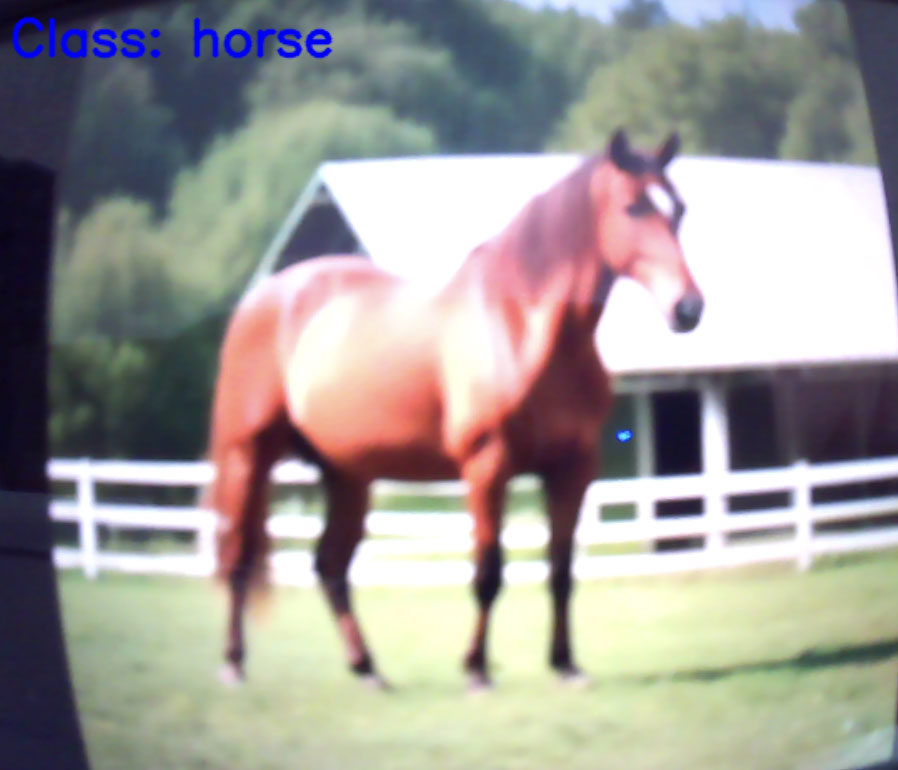
USBカメラの画像が表⽰され、推論結果(クラス名)が表⽰されます。
あとがき
弊社では、このようなAIアプリ/モデルの開発や、AI向けのSoC/アクセラレータのご紹介や、評価、アプリ開発などを⾏っております。
ご興味のある⽅はぜひお問い合わせください。