Introduction
This article provides a detailed explanation of the implementation of a multitasking system using Azure RTOS ThreadX, a high-performance real-time operating system (RTOS) for embedded systems that is available as part of Microsoft Azure.
Target audience for this article
- New to ThreadX?
- Those who want to learn the basic concepts of RTOS
- People interested in multitask programming
- Those looking for practical examples of inter-task communication implementation
Learning Objectives
After reading this article, you will gain the following knowledge and skills:
- Basic usage of ThreadX
- How to create and manage tasks (threads)
- Choosing between message queues, semaphores, event flags, and mutexes
- Implementing the Producer-Consumer Pattern
- Priority-based scheduling control
Project Overview
Hardware used
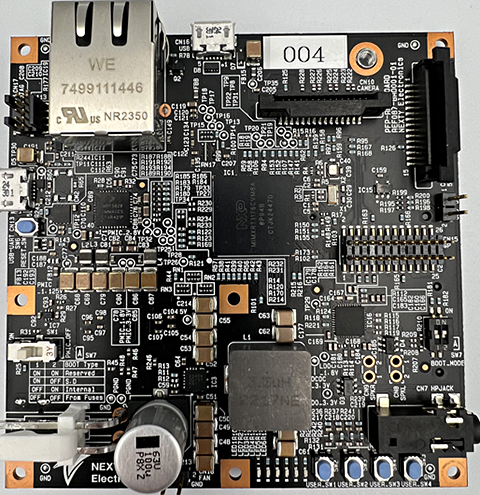
- Board: NXT i.MX RT1170 reference board
- Processor: ARM Cortex-M7 (up to 1GHz)
- Development environment: MCUXpresso IDE 11.9.0
Project Objective
This demo project is designed to give you hands-on experience learning key features of ThreadX:
- 1. Cooperative operation by five threads
- 2. Implementation of four communication mechanisms
- 3. Utilizing priority control and time slicing
- 4. Producer-Consumer Pattern for Sensor Data Processing
ThreadX Basic Concepts
What is RTOS?
An RTOS (Real-Time Operating System) is an operating system used in embedded systems that require real-time performance. It is characterized by deterministic operation and fast response times.
ThreadX Features
- Fast: Works with minimal overhead
- Small footprint: low memory usage
- Deterministic: predictable execution time
- Priority-based: preemptive scheduling
- Rich communication functions: queues, semaphores, event flags, mutexes, etc.
What is a thread (task)?
A thread is an independently executing unit of work. Each thread has:
- Unique stack area: stores local variables and function call information
- Priority: The scheduler decides which threads to run
- Status: Running, Ready, Waiting, Suspended, etc.
System Architecture
Thread Configuration
This demo uses five threads:
| Thread Name | priority | Time Slice | role |
|---|---|---|---|
| Command Thread | 1 (best) | 5 ticks | System-wide control and command issuance |
| Scheduler Thread | 2 | none | Event monitoring and high priority processing |
| Producer Thread | 3 | none | Sensor Data Generation |
| Consumer Thread | 4 | none | Data processing and statistics update |
| Monitor Thread | 5 (minimum) | none | System Monitoring and Reporting |
Communication Objects
| Object | Purpose |
|---|---|
| Message Queue | Sensor data transfer |
| Event Flags | Multiple event notification and synchronization |
| Semaphore | Controlling batch processing |
| Mutex | Protection of shared data (statistics) |
Details of the initialization process
Implementing the main function
int main(void)
    {
        BOARD_ConfigMPU();
        BOARD_InitPins();
        BOARD_BootClockRUN();
        BOARD_InitDebugConsole();

        PRINTF("\r\n=== Azure RTOS ThreadX タスク&通信デモ ===\r\n");
        PRINTF("- 優先度/タイムスライス制御\r\n");
        PRINTF("- メッセージキュー/イベントフラグ/セマフォ/ミューテックス\r\n");
        PRINTF("- プロデューサー&コンシューマー+監視パターン\r\n\r\n");

        tx_kernel_enter();
        return 0;
    }
Process flow:
1. Hardware initialization
BOARD_ConfigMPU(): Memory Protection Unit SettingsBOARD_InitPins(): Initializing GPIO pinsBOARD_BootClockRUN(): Clock settings (CPU operating frequency, etc.)BOARD_InitDebugConsole(): Initialize serial communication for debugging
2. Starting the ThreadX kernel
tx_kernel_enter(): Starts the ThreadX kernel (this function does not return)- After the kernel starts,
tx_application_define()will be called automatically
tx_application_define function
This function is called automatically by the ThreadX kernel to initialize the application.
1. Creating a memory pool
assert_success("byte_pool_create",
                   tx_byte_pool_create(&demo_byte_pool, "demo byte pool",
                                       demo_memory_pool, DEMO_BYTE_POOL_SIZE));
The byte pool is used for dynamic memory allocation, in this demo we use it to allocate stack space for each thread.
- Size: 8192 bytes
- Use: Dynamic allocation of thread stacks
2. Creating a message queue
assert_success("queue_create",
                   tx_queue_create(&sensor_queue, "sensor queue",
                                   SENSOR_QUEUE_MSG_SIZE, sensor_queue_buffer,
                                   sizeof(sensor_queue_buffer)));
Important parameters of the message queue:
- Message size:
SENSOR_QUEUE_MSG_SIZE=sizeof(sensor_message_t) / sizeof(ULONG) - Queue depth: 16 messages
- Buffer: a statically allocated array
sensor_message_t structure:
typedef struct SensorMessage
    {
        ULONG sensor_id;    // センサーID
        ULONG value;        // センサー値
        ULONG timestamp;    // タイムスタンプ
    } sensor_message_t;
3. Creating an event flag
assert_success("event_flags_create",
                   tx_event_flags_create(&system_events, "system events"));
Event flags manage multiple events in a single object:
    #define EVENT_SENSOR_DATA_READY   (1U << 0)  // ビット0: センサーデータ準備完了
    #define EVENT_HIGH_PRIORITY_ALERT (1U << 1)  // ビット1: 高優先度アラート
    #define EVENT_BATCH_COMPLETE      (1U << 2)  // ビット2: バッチ処理完了
    #define EVENT_ALERT               (1U << 3)  // ビット3: 一般アラート
4. Creating a semaphore
assert_success("semaphore_create",
                   tx_semaphore_create(&batch_semaphore, "batch semaphore", 0));
Semaphores are used to control batch processing:
- Initial count: 0 (initially locked)
- Purpose: Controls the start of batch processing for the Producer thread
5. Creating a Mutex
assert_success("mutex_create",
                   tx_mutex_create(&metrics_mutex, "metrics mutex", TX_INHERIT));
Mutexes are used for exclusive control of shared data:
TX_INHERIT: Enable priority inheritance (prevents priority inversion problems)- Usage:
g_metricsProtecting Access to structures
Data protected:
typedef struct SystemMetrics
    {
        ULONG samples_processed;  // 処理済みサンプル数
        ULONG last_value;         // 最後に処理した値
    } system_metrics_t;
6. Creating a Thread
Each thread istx_thread_create()Let's take a look at the Command Thread as an example:
assert_success("thread command",
                   tx_thread_create(&command_thread, "command thread",
                                    command_thread_entry, 0,
                                    allocate_stack("command"), DEMO_THREAD_STACK_SIZE,
                                    COMMAND_THREAD_PRIO, COMMAND_THREAD_PRIO,
                                    COMMAND_TIME_SLICE, TX_AUTO_START));
Parameter description:
&command_thread: A pointer to the thread control block"command thread": Thread name (for debugging)command_thread_entry: Thread entry function0: Arguments to pass to the threadallocate_stack("command"): Stack area (1024 bytes)COMMAND_THREAD_PRIO: Priority (1 = highest priority)COMMAND_TIME_SLICE: time slice (5 ticks)TX_AUTO_START: Make it executable immediately after creation
Stack allocation functions:
static VOID *allocate_stack(const char *name)
    {
        VOID *stack_pointer = TX_NULL;
        UINT status = tx_byte_allocate(&demo_byte_pool, &stack_pointer,
                                       DEMO_THREAD_STACK_SIZE, TX_NO_WAIT);
        assert_success(name, status);
        memset(stack_pointer, 0, DEMO_THREAD_STACK_SIZE);
        return stack_pointer;
    }
This function dynamically allocates stack space from the byte pool, zeros it, and returns it.
Implementation explanation of each thread
1. Command Thread (Priority 1: Highest)
The Command Thread is the highest priority thread that controls the entire system.
static void command_thread_entry(ULONG thread_input)
    {
        UINT iteration = 0;

        bool producer_paused = false;

        while (true)
        {
            switch (iteration % 6U)
            {
                case 0U:
                    demo_log("command", "新しいサンプリングバッチを許可\r\n");
                    tx_semaphore_put(&batch_semaphore);
                    break;
                case 1U:
                    demo_log("command", "高優先度アラートを発行\r\n");
                    tx_event_flags_set(&system_events, EVENT_HIGH_PRIORITY_ALERT, TX_OR);
                    break;
                case 2U:
                    if (!producer_paused)
                    {
                        demo_log("command", "プロデューサースレッドを一時停止\r\n");
                        tx_thread_suspend(&producer_thread);
                        producer_paused = true;
                    }
                    break;
                case 3U:
                    if (producer_paused)
                    {
                        demo_log("command", "プロデューサースレッドを再開\r\n");
                        tx_thread_resume(&producer_thread);
                        producer_paused = false;
                    }
                    break;
                case 4U:
                    demo_log("command", "監視系イベントを通知\r\n");
                    tx_event_flags_set(&system_events, EVENT_ALERT, TX_OR);
                    break;
                default:
                    demo_log("command", "CPUを明示的に譲渡\r\n");
                    tx_thread_relinquish();
                    break;
            }

            iteration++;
            tx_thread_sleep(COMMAND_PERIOD_TICKS);  // 150 ticks待機
        }
    }
Key features:
1. Semaphore issue (case 0)
tx_semaphore_put()Give permission to batch processing to the producer thread
2. Setting the event flag (case 1, case 4)
tx_event_flags_set()Get notified of various eventsTX_OROptional: Combine with existing flags using an OR operation
3. Thread control (case 2, case 3)
tx_thread_suspend(): Pause the producer threadtx_thread_resume(): Resume the producer thread- This demonstrates dynamic thread control.
4. CPU transfer (default)
tx_thread_relinquish(): Yields the CPU to other threads with the same priority- Because time slices are set, they also switch automatically
Effects of time slicing:
Command ThreadCOMMAND_TIME_SLICE = 5 ticksThis causes an automatic context SWITCHES after 5 ticks if there are threads with the same priority.
2. Scheduler Thread (Priority 2)
The Scheduler Thread monitors events and processes them with high priority.
static void scheduler_thread_entry(ULONG thread_input)
    {
        while (true)
        {
            ULONG high_flags = 0;
            UINT status = tx_event_flags_get(&system_events,
                                             EVENT_HIGH_PRIORITY_ALERT | EVENT_ALERT,
                                             TX_OR_CLEAR, &high_flags, 50U);

            if ((status == TX_SUCCESS) && (high_flags != 0U))
            {
                if ((high_flags & EVENT_HIGH_PRIORITY_ALERT) != 0U)
                {
                    demo_log("scheduler", "高優先度アラートを検出 - 緊急処理\r\n");
                }
                if ((high_flags & EVENT_ALERT) != 0U)
                {
                    demo_log("scheduler", "モニタからの注意喚起イベント\r\n");
                }
            }

            ULONG combo_flags = 0;
            status = tx_event_flags_get(&system_events,
                                        EVENT_SENSOR_DATA_READY | EVENT_BATCH_COMPLETE,
                                        TX_AND_CLEAR, &combo_flags, TX_NO_WAIT);
            if (status == TX_SUCCESS)
            {
                demo_log("scheduler", "AND条件(センサ+バッチ完了)を満たしました\r\n");
            }

            tx_thread_sleep(20U);
        }
    }
How to get an event flag:
1. OR condition acquisition (firsttx_event_flags_get)
EVENT_HIGH_PRIORITY_ALERT | EVENT_ALERT: It's OK if either flag is set.TX_OR_CLEAR: After getting the flag, it is automatically cleared- Timeout: 50 ticks (Waits up to 50 ticks before flagging)
2. AND condition acquisition (secondtx_event_flags_get)
EVENT_SENSOR_DATA_READY | EVENT_BATCH_COMPLETE: Both flags are requiredTX_AND_CLEAR: Only acquire and clear if both are standingTX_NO_WAIT: Do not wait, return results immediately
Key points:
- Event flags can be set and retrieved simultaneously from multiple threads.
TX_OR_CLEARandTX_AND_CLEARallows automatic clearing of flags- Timeout settings allow for flexible wait control
3. Producer Thread (Priority 3)
The Producer Thread generates sensor data and sends it to a queue.
static void producer_thread_entry(ULONG thread_input)
    {
        ULONG sample_id = 0;

        while (true)
        {
            tx_semaphore_get(&batch_semaphore, TX_WAIT_FOREVER);
            demo_log("producer", "サンプリングバッチを開始\r\n");

            for (ULONG i = 0; i < SENSOR_BATCH_SIZE; i++)
            {
                sensor_message_t message;
                message.sensor_id = (sample_id % 4U) + 1U;
                message.value = 100U + sample_id;
                message.timestamp = tx_time_get();

                assert_success("queue_send",
                               tx_queue_send(&sensor_queue, &message, TX_WAIT_FOREVER));

                tx_event_flags_set(&system_events, EVENT_SENSOR_DATA_READY, TX_OR);
                sample_id++;

                tx_thread_sleep(PRODUCER_DELAY_TICKS);  // 20 ticks
            }

            tx_event_flags_set(&system_events, EVENT_BATCH_COMPLETE, TX_OR);

            if ((sample_id % 15U) == 0U)
            {
                demo_log("producer", "閾値超過→高優先度アラート\r\n");
                tx_event_flags_set(&system_events, EVENT_HIGH_PRIORITY_ALERT, TX_OR);
            }
        }
    }
Processing flow:
1. Semaphore wait
tx_semaphore_get(&batch_semaphore, TX_WAIT_FOREVER)- Wait indefinitely for a semaphore to become available
- Command Thread
tx_semaphore_put()Block until called
2. Batch processing
- Generates 5 sensor messages (
SENSOR_BATCH_SIZE = 5) - Send each message to a queue
tx_time_get()Get the current system tick count with
3. Event Notifications
- After each message is sent
EVENT_SENSOR_DATA_READYSet - After the batch is complete
EVENT_BATCH_COMPLETESet - Every 15 samples
EVENT_HIGH_PRIORITY_ALERTIssue
Send to message queue:
tx_queue_send(&sensor_queue, &message, TX_WAIT_FOREVER);- If the queue is full, wait until space becomes available
- The message is copied and stored in the queue
- FIFO (first in, first out) system
4. Consumer Thread (Priority 4)
The Consumer Thread receives messages from the queue and processes them.
static void consumer_thread_entry(ULONG thread_input)
    {
        sensor_message_t message;

        while (true)
        {
            if (tx_queue_receive(&sensor_queue, &message, TX_WAIT_FOREVER) == TX_SUCCESS)
            {
                assert_success("metrics_mutex_get",
                               tx_mutex_get(&metrics_mutex, TX_WAIT_FOREVER));

                g_metrics.samples_processed++;
                g_metrics.last_value = message.value;

                tx_mutex_put(&metrics_mutex);

                demo_log("consumer",
                         "センサ%lu: value=%lu timestamp=%lu\r\n",
                         message.sensor_id, message.value, message.timestamp);
            }
        }
    }
Processing flow:
1. Receiving a message from a queue
tx_queue_receive(&sensor_queue, &message, TX_WAIT_FOREVER)- If the queue is empty, wait until a message arrives
2. Mutex-based exclusive control
tx_mutex_get(&metrics_mutex, TX_WAIT_FOREVER): Acquire the mutex- Shared Data
g_metricsSafely update tx_mutex_put(&metrics_mutex): Release the mutex
3. Statistics Updates
- Increment the number of processed samples
- Record the last processed value
Importance of Mutexes:
g_metricsis Access by both the Consumer Thread and the Monitor Thread. By using a mutex:
- Guaranteed data integrity
- Preventing race conditions
- Priority inheritance prevents priority inversion problems
5. Monitor Thread (priority 5: lowest)
The Monitor Thread periodically monitors the system status.
static void monitor_thread_entry(ULONG thread_input)
    {
        while (true)
        {
            tx_thread_sleep(MONITOR_PERIOD_TICKS);  // 300 ticks

            system_metrics_t snapshot;
            assert_success("metrics_mutex_get",
                           tx_mutex_get(&metrics_mutex, TX_WAIT_FOREVER));
            snapshot = g_metrics;
            tx_mutex_put(&metrics_mutex);

            demo_log("monitor", "処理サンプル=%lu, 最終値=%lu\r\n",
                     snapshot.samples_processed, snapshot.last_value);

            if ((snapshot.samples_processed != 0U) &&
                (snapshot.samples_processed % 20U == 0U))
            {
                tx_event_flags_set(&system_events, EVENT_ALERT, TX_OR);
            }
        }
    }
Processing flow:
1. Regular monitoring
- Executes every 300 ticks (approximately 3 seconds)
- Lowest priority, so it waits while other threads are running
2. Taking a snapshot
- Safely copy shared data protected by a mutex
- Minimizing mutex hold time
3. Condition Check and Event Generation
- Every 20 samples
EVENT_ALERTIssue - Notify the Scheduler Thread
Inter-task communication mechanism
This demo uses four different communication mechanisms. Let's understand the characteristics of each and when to use them.
1. Message Queue
Use: Data transfer
Features:
- FIFO (first in, first out) system
- Stores fixed-size messages
- The sender and receiver can be loosely coupled
- The buffering function absorbs differences in processing speed
Examples of use in this demo:
// Producer側(送信)
    sensor_message_t message;
    message.sensor_id = 1;
    message.value = 100;
    message.timestamp = tx_time_get();
    tx_queue_send(&sensor_queue, &message, TX_WAIT_FOREVER);

    // Consumer側(受信)
    sensor_message_t message;
    tx_queue_receive(&sensor_queue, &message, TX_WAIT_FOREVER);
Applicable scene:
- Sensor data collection and processing
- Sending and receiving commands
- Forwarding log messages
2. Semaphore
Uses: Resource control, synchronization
Features:
- Counting semaphores (with integer values greater than or equal to 0)
tx_semaphore_get()Decrement the count (wait if 0)tx_semaphore_put()Increment the count with- You can manage the number of resources
Examples of use in this demo:
// Command Thread(許可を与える側)
    tx_semaphore_put(&batch_semaphore);

    // Producer Thread(許可を待つ側)
    tx_semaphore_get(&batch_semaphore, TX_WAIT_FOREVER);
    // セマフォ取得後、バッチ処理を実行
Applicable scene:
- Controlling batch processing
- Managing Resource Pools
- Event notification (as a binary semaphore)
3. Event Flags
Use: Multiple event notification and synchronization
Features:
- Manages 32-bit flags (up to 32 events)
- OR condition: Acquire if any flag is set
- AND condition: Acquire only when all flags are set
- Multiple threads can wait at the same time
Examples of use in this demo:
// イベントの設定(複数のスレッドから)
    tx_event_flags_set(&system_events, EVENT_SENSOR_DATA_READY, TX_OR);
    tx_event_flags_set(&system_events, EVENT_BATCH_COMPLETE, TX_OR);

    // OR条件での取得(どちらか一方でOK)
    ULONG flags;
    tx_event_flags_get(&system_events,
                       EVENT_HIGH_PRIORITY_ALERT | EVENT_ALERT,
                       TX_OR_CLEAR, &flags, 50U);

    // AND条件での取得(両方必要)
    tx_event_flags_get(&system_events,
                       EVENT_SENSOR_DATA_READY | EVENT_BATCH_COMPLETE,
                       TX_AND_CLEAR, &flags, TX_NO_WAIT);
Applicable scene:
- Synchronizing multiple conditions
- System status notifications
- Complex event-driven processing
4. Mutex
Use: Mutual exclusion
Features:
- There is a concept of ownership (only the acquiring thread can release it)
- Supports priority inheritance (prevents priority inversion problems)
- Nested locks are possible (the same thread can acquire multiple times)
- More suitable for exclusive control than semaphores
Examples of use in this demo:
// Consumer Thread
    tx_mutex_get(&metrics_mutex, TX_WAIT_FOREVER);
    g_metrics.samples_processed++;  // クリティカルセクション
    g_metrics.last_value = message.value;
    tx_mutex_put(&metrics_mutex);

    // Monitor Thread
    tx_mutex_get(&metrics_mutex, TX_WAIT_FOREVER);
    system_metrics_t snapshot = g_metrics;  // 安全にコピー
    tx_mutex_put(&metrics_mutex);
How priority inheritance works:
- 1. A low-priority thread (Monitor) acquires the mutex
- 2. A high-priority thread (Consumer) requests the same mutex.
- 3. ThreadX automatically raises the priority of the Monitor to the same as the Consumer.
- 4. When the Monitor releases the mutex, it returns to its original priority.
This prevents "priority inversion," where a medium-priority thread blocks a high-priority thread.
Applicable scene:
- Protecting Shared Data Structures
- Exclusive Access to hardware resources
- Critical section protection
Communication Mechanism Selection Guide
| the purpose | Recommended Mechanisms | reason |
|---|---|---|
| Data transfer | Message Queue | Data Copying and Buffering |
| Managing the number of resources | semaphore | Counting Function |
| Simple Notification | Semaphore (binary) | Simple and fast |
| Synchronizing multiple conditions | Event flags | Support for AND/OR conditions |
| Protecting shared data | Mutex | Safety through priority inheritance |
Execution results and operation check
Serial Output Example
When you run the program, you will see the following log output:
=== Azure RTOS ThreadX タスク&通信デモ ===
    - 優先度/タイムスライス制御
    - メッセージキュー/イベントフラグ/セマフォ/ミューテックス
    - プロデューサー&コンシューマー+監視パターン

    [command] 新しいサンプリングバッチを許可
    [producer] サンプリングバッチを開始
    [consumer] センサ1: value=100 timestamp=15
    [consumer] センサ2: value=101 timestamp=35
    [consumer] センサ3: value=102 timestamp=55
    [consumer] センサ4: value=103 timestamp=75
    [consumer] センサ1: value=104 timestamp=95
    [scheduler] AND条件(センサ+バッチ完了)を満たしました
    [command] 高優先度アラートを発行
    [scheduler] 高優先度アラートを検出 - 緊急処理
    [monitor] 処理サンプル=5, 最終値=104
    [command] プロデューサースレッドを一時停止
    [command] プロデューサースレッドを再開
    [command] 新しいサンプリングバッチを許可
    ...
Operation flow
- 1. The Command Thread issues various commands every 150 ticks
- 2. The producer thread acquires the semaphore and starts batch processing.
- 3. Send 5 messages to the queue (each 20 ticks apart)
- 4. The consumer thread receives messages from the queue and updates statistics.
- 5. The Scheduler Thread monitors the event flag and processes it according to the conditions.
- 6. Monitor Thread reports system status every 300 ticks
Debugging Tips
Error Handling
static void assert_success(const char *context, UINT status)
    {
        if (status != TX_SUCCESS)
        {
            PRINTF("ERROR: %s failed (status=%u)\r\n", context, status);
            while (1)
            {
                __NOP();
            }
        }
    }
This function allows immediate detection of ThreadX API call errors.
Common errors:
TX_QUEUE_FULLQueue is full (increase queue depth or speed up consumer processing)TX_NO_MEMORY: Memory pool shortage (DEMO_BYTE_POOL_SIZE(increaseTX_DELETED: Object has been deleted (check object lifecycle)
Conclusion
In this article, we will show you the actual code (threadx_demo.c) and learned everything from the basics of ThreadX to practical usage.
ThreadX is a high-performance and easy-to-use RTOS, but it is important to understand the inherent caveats of multitasking programming (deadlocks, priority inversions, race conditions, etc.).
Try developing a real application based on this demo project. It can be used for a variety of purposes, including sensor data processing, motor control, and communication protocol implementation.
NEXTY Electronics Initiatives
NEXTY Electronics Corporation is a core company in the Toyota Tsusho Group's electronics business and boasts one of the largest scales in the field of car electronics.
With technology and products at our core, we will meet the needs of our customers and society in a wide range of fields, provide solutions to social issues, and contribute to the realization of a better society.
Additionally, NEXTY Electronics' development team utilizes the products it handles to carry out in-house development and contract development (hardware and software development).
We will be happy to assist you with any problems you may have, so please feel free to contact us.