Introduction
Hello, this is a member of the Development Department at Nexty Electronics.
I am in charge of technical support for GPU Advanced Test Drive (GAT), which offers a highly flexible trial of various GPU servers at an affordable price and with a dedicated contract period.

NVIDIA's latest version of Cosmos, Cosmos 3, was released on June 1, 2026. From my understanding, it appears to be an omnimodal model integrating the following three features, which were present in Cosmos 2.5 and earlier versions.
- Cosmos Reason (Understanding Images)
- Cosmos Predict (Future prediction and video generation)
- Cosmos Transfer (video converter) *Available from mid-June
This article will explain how to run the video generation section and compare it to previous versions.
Review environment
This test was conducted on a desktop PC with the following specifications. It should also be possible to run this test on GAT-based DGX-H100/DGX-B200 models.
| Category | Value |
|---|---|
| OS | Ubuntu 22.04 |
| GPU | RTX-PRO6000 Blackwell Max-q(96G) |
| CPU | 13th Gen Intel(R) Core(TM) i5-13600K |
| Memory | 128G |
Setting up the environment for video generation
In Cosmos3, the video generation side is called the Generator, and the video interpretation side is called the Reasoner. Here, we will set up the Python environment for the video generation Generator. This will be built using uv (which is becoming mainstream these days, as it is faster than pip and other methods, and does not require as much storage space as Docker). Basically, you should be able to set it up by following these steps.
UV may already be installed in many cases, but if it's not installed on Ubuntu, you can install it from the following link.
(OTHERS installation instructions, please refer to the official UV website.)
curl -LsSf https://astral.sh/uv/install.sh | shTo download the model from huggingface midway through the process, you will need to log in using the hf command or set Access token to huggingface in your environment variables.
(Also, if you encounter an error when downloading the model, you will need to open the model page in your browser and obtain permission.)
uvx hf@latest auth login
# or:
export HF_TOKEN=your_token
Once the above preparations are complete, first clone the cosmos3 GitHub repository.
The author has renamed it to cosmos3 to avoid confusion with other versions.
git clone https://github.com/nvidia/cosmos.git cosmos3
cd cosmos3
Clone the repository (cosmos-framework) for setting up the Cosmos Python execution environment.
mkdir -p packages
git clone https://github.com/NVIDIA/cosmos-framework.git packages/cosmos3
cd packages/cosmos3
Then, if you do the following,packages/cosmos3/.venv The environment will be generated as follows:
export GIT_LFS_SKIP_SMUDGE=1
uv sync --all-extras --group=cu130-train
##cuda128以前のドライバの場合は、以下に変更してください
## uv sync --all-extras --group=cu128-train
The generated environment will be enabled as follows:
#packages/cosmos3/.venvに生成されている
source .venv/bin/activate
The beginning of the command prompt is as follows:(cosmos-framework)If so, then it's a success.
(cosmos-framework) user@host:/home/user/cosmos3/packages/cosmos3 $ Generating NVIDIA samples (text2video/image2video)
Here, we will try out the functions that correspond to Predict in the old version: generating a video from prompts only (text2video), or inputting a still image of the first FRAMES and generating the rest of the video according to the prompt's instructions (image2video).
Cosmos3's Generator models mainly include the 16B Cosmos3-Nano and the 64B Cosmos3-Super, but this article will focus on the 16B model.Cosmos3-Nano
cosmos3's GitHubcookbooks/cosmos3/generator/audiovisual/There is a sample available, so we will run that.
Navigate to the following directory.
cd cookbooks/cosmos3/generator/audiovisual/Run the following script. (Previously, the example involved creating a JSON file in Python and then running torchrun, but this seems to have changed.)
python3 - <<'PY'
import json
from pathlib import Path

prompt = json.dumps(
    json.load(open("assets/prompts/text2video/car_colliding.json")),
    ensure_ascii=True,
    separators=(",", ":"),
)
negative = json.dumps(
    json.load(open("assets/negative_prompts/text2video/neg_prompt.json")),
    ensure_ascii=True,
    separators=(",", ":"),
)
payload = {
    "model_mode": "text2video",
    "name": "car_colliding",
    "prompt": prompt,
    "negative_prompt": negative,
    "enable_sound": False,
    "num_steps": 35,
    "guidance": 6.0,
    "shift": 10.0,
    "fps": 24,
    "num_frames": 189,
    "resolution": "720",
    "aspect_ratio": "16,9",
    "seed": 0,
}
Path("nexty_car01/car_colliding.json").write_text(json.dumps(payload, indent=2) + "\n")
PY

torchrun --nproc-per-node=1 \
  -m cosmos_framework.scripts.inference \
  --parallelism-preset=throughput \
  -i nexty_car01/car_colliding.json \
  -o nexty_car01/out \
  --checkpoint-path Cosmos3-Nano \
  --seed=1
When you run this, the Cosmos3-Nano model will download the first time, and after waiting for a while (about 9 minutes on an RTX-PRO6000 environment), a snow-covered accident scene like the one below should be generated.
During execution, it appears to use around 50GB+ of GPU memory, so this process requires a fairly high-spec GPU.
Also, when I ran the image2video sample located in the same directory, the following video was generated.
Compared to cosmos-predict2.5, improvements in realism and other aspects of accuracy can be observed.
Prompt format
Based on the NVIDIA sample JSON, it appears that the prompt format has changed significantly from the simple single-text format used in Predict 2.5 and similar applications. It can now include information such as "the subject and its description" and "what will happen at what time."
The NVIDIA sample prompt used for generating the first video with text2video is this car_colliding.json (see link).
For your understanding, I have provided a machine translation of the content below (please specify in English).
{
"subjects": [
{
  "description": "ダッシュカム車両の真正面にいる濃いグレーのセダン。ルーフとトランクに薄っすらと雪が積もっており、赤いテールランプが見えている",
  "appearance_details": "標準的なミッドサイズセダン。路面のシャーベット状の雪で少し汚れており、ナンバープレートは雪しぶきで一部見えにくくなっている",
  "relationship": "ダッシュカム車両の前を走る1台目の車で、衝突事故に巻き込まれる",
  "location": "画面中央のミッドグラウンド",
  "relative_size": "フレーム内では中サイズ",
  "orientation": "カメラに対して背を向けており、前進してから左方向にスリップしていく",
  "pose": "走行中の車両",
  "action": "前進していたが、グリップを失い横滑りしながら交差点に進入する",
  "state_changes": "安定した前進走行から制御不能な横滑りへ移行し、その後2台目の車と衝突する",
  "clothing": "",
  "expression": "",
  "gender": "",
  "age": "",
  "skin_tone_and_texture": "",
  "facial_features": "",
  "number_of_subjects": 1,
  "number_of_arms": 0,
  "number_of_legs": 0
},
{
  "description": "交差点の右側から接近してくる白いSUV。ヘッドライトが点灯しており、ボンネットとフロントガラスの縁に雪が積もっている",
  "appearance_details": "ルーフレール付きのミッドサイズ白色SUV。フォグランプが点灯しており、後輪の後方にタイヤしぶきが見える",
  "relationship": "衝突事故に巻き込まれる2台目の車両で、右側から交差点を横切る",
  "location": "右側ミッドグラウンドから中央へ向かって移動",
  "relative_size": "フレーム内では中サイズ",
  "orientation": "左を向いている(ダッシュカムの進行方向に対して垂直に交差点を横切る)",
  "pose": "走行中の車両",
  "action": "交差点に進入し、横滑りしてきたグレーのセダンに衝突する",
  "state_changes": "右側からフレーム中央へ移動し、急ブレーキをかけるが氷上で滑り、グレーのセダン側面に衝突。衝突地点から炎が噴き上がる",
  "clothing": "",
  "expression": "",
  "gender": "",
  "age": "",
  "skin_tone_and_texture": "",
  "facial_features": "",
  "number_of_subjects": 1,
  "number_of_arms": 0,
  "number_of_legs": 0
},
{
  "description": "フレーム下部にかろうじて見えるダッシュカム車両のボンネット先端。濃色の車体で、ボンネットには雪が薄く積もっている",
  "appearance_details": "黒またはダークブルーのボンネットの一部が見えており、ワイパーは雪を払いながら作動中の中間位置にある",
  "relationship": "映像を記録しているPOV車両で、グレーのセダンの後ろを走行している",
  "location": "フレーム下端(一部のみ)",
  "relative_size": "フレーム内では小サイズ",
  "orientation": "前方向き(カメラ視点)",
  "pose": "走行中の車両",
  "action": "前進しつつ、前方で事故が起こると減速していく",
  "state_changes": "前方で事故が発生するにつれ、徐々に減速する",
  "clothing": "",
  "expression": "",
  "gender": "",
  "age": "",
  "skin_tone_and_texture": "",
  "facial_features": "",
  "number_of_subjects": 1,
  "number_of_arms": 0,
  "number_of_legs": 0
}
],
"background_setting": "冬の積雪に覆われた市街地の交差点。道路は2車線で、アスファルト上に雪とシャーベット状の雪が広がり、雪の上にはタイヤ痕が見える。交差点には信号機が頭上に吊り下げられ、降雪を通して赤と緑に光っている。道路の両側には葉を落とした木々、雪の積もった歩道、雪に覆われた屋根を持つ低層の商業ビルが並ぶ。激しい積雪のため、交差点には車線標示が見えない。縁石沿いには雪の山が積み上がり、降雪により視界はやや低下している。",
"lighting": {
"conditions": "曇天の冬の昼光で、灰色の空からの拡散光に、車両のヘッドライトとテールライトが加わっている",
"direction": "厚い雲のため強い指向性のない、上方からの拡散光",
"shadows": "曇天のため非常に柔らかく最小限。ヘッドライトが雪に反射することで車両下にわずかな影ができる程度",
"illumination_effect": "白い雪面の高い反射率と相まって、冷たく平板な光がコントラストの低い色あせたシーンを作り出し、炎が噴き上がる瞬間に突如として暖色系の光に変わる"
},
"aesthetics": {
"composition": "交差点を消失点とする道路中心の構図で、車両が道路の中心線に沿って配置され、視線を衝突地点へと導く",
"color_scheme": "雪と曇り空による白とグレーが基調。濃色の車体(グレー、白)、赤いテールランプが映え、最後に炎による鮮やかなオレンジと黄色が突如現れる",
"mood_atmosphere": "張り詰めて不吉、冷たく危険な雰囲気が、混沌として警戒すべき状況へとエスカレートする",
"patterns": "雪の上に繰り返されるタイヤ痕、フレーム全体に降る雪片が均一なパーティクル状のパターンを作り出す"
},
"cinematography": {
"camera_motion": "走行中の車両に取り付けられたダッシュカム特有の、わずかな前進運動と微振動。終盤には減速によるかすかな揺れ",
"framing": "低い位置に取り付けられたダッシュカム視点からの広角ショットで、前方の道路と交差点全体を捉える",
"camera_angle": "目線よりわずかに低い、フロントガラスへの一般的なダッシュカム取り付け位置",
"depth_of_field": "深い",
"focus": "前方の道路とミッドグラウンドの車両がシャープに合焦している",
"lens_focal_length": "約28mm相当の広角で、画面端にわずかな樽型歪みあり"
},
"style_medium": "実写映像",
"artistic_style": "リアルなダッシュカム映像、ドキュメンタリー調",
"context": "凍結した交差点で発生した冬の運転事故のダッシュカム録画。複数車両による衝突事故を捉えている",
"actions": [
{
  "time": "0:00-0:03",
  "description": "ダッシュカム車両は雪に覆われた道路を安定して前進し、前方にグレーのセダンが見える交差点に近づいていく。雪は降り続いており、路面は滑りやすい。"
},
{
  "time": "0:03-0:05",
  "description": "前方のグレーのセダンが交差点手前でブレーキをかけ始めるが、グリップを失い、後輪が左に流れて制御不能な横滑り状態で交差点に進入する。同時に、右側から白いSUVが進入してくる。"
},
{
  "time": "0:05-0:07",
  "description": "白いSUVとグレーのセダンが交差点中央で激しく衝突する。破片が雪上に飛び散り、衝突地点から炎が噴き上がり、両車両の前部が火に包まれる中、ダッシュカム車両は急ブレーキをかける。"
}
],
"text_and_signage_elements": [
{
  "text": "2024/01/15 14:32:07",
  "category": "ui_text",
  "appearance": "わずかに透明な小さな白い等幅フォントで、右下隅に表示",
  "spatial_temporal": "フレームの右下隅、映像全体を通して表示",
  "context": "録画日時を示すダッシュカムのタイムスタンプ表示"
},
{
  "text": "STOP",
  "category": "scene_sign",
  "appearance": "白い文字が入った赤い八角形の標識で、雪の付着により一部隠れている",
  "spatial_temporal": "フレーム右側の交差点付近、0:02以降に視認可能",
  "context": "交差点の一時停止標識"
}
],
"segments": [
{
  "segment_index": 0,
  "time_range": "0:00-0:03",
  "description": "ダッシュカム車両が雪に覆われた道路で交差点に接近する。前方にはグレーのセダンが見え、中程度の速度で走行している。雪が降っており、路面状態が悪いことが見て取れる。",
  "key_changes": "交差点までの距離が縮まり、交差点がはっきり見えるようになり、信号機が判別できるようになる",
  "camera": "安定した前進運動とわずかな路面振動。滑りやすい路面に応じたわずかな横滑り感"
},
{
  "segment_index": 1,
  "time_range": "0:03-0:05",
  "description": "グレーのセダンが制御を失い、交差点に進入しながら横滑りを始める。右側からは白いSUVが現れるが、こちらも凍結路面で停止できない。",
  "key_changes": "グレーのセダンが正面向きから横向きへ回転し、白いSUVが右側からフレームに入り、両車両のブレーキランプが強く点灯する",
  "camera": "ダッシュカム車両が反応して前進が緩み、ブレーキングによるわずかなピッチダウンが見られる"
},
{
  "segment_index": 2,
  "time_range": "0:05-0:07",
  "description": "両車両が交差点中央で大きな衝撃と共に衝突する。金属がひしゃげ、破片が雪に覆われた道路上に飛び散り、衝突地点から炎が噴き上がり、急速に広がっていく。",
  "key_changes": "衝突により車両が変形し、火災が発生して拡大、破片が雪上に散らばり、シーンは冷たいトーンから炎の暖かいオレンジ色へと変化する",
  "camera": "ダッシュカム車両はほぼ停止し、急ブレーキでカメラがわずかに揺れ、炎上する残骸を静止した視点で映し出す"
}
],
"transitions": [],
"temporal_caption": "映像は、降雪の中、雪に覆われた道路を走行する車両のダッシュカム視点から始まる。前方にはグレーのセダンが見え、灰色の冬の光の中でテールランプが赤く光っている。路面は圧雪とシャーベット状の雪で滑りやすい。最初の3秒間で、車両は頭上に信号機がある交差点に近づいていく。3秒あたりで、前方のグレーのセダンがブレーキをかけようとするが、即座にグリップを失い、後輪が流れて横向きに交差点へ滑り込む。同じ瞬間、右側からも白いSUVが交差点に進入してきて、これも氷の上で滑っている。5秒の時点で、両車両は交差点中央で凄まじい衝撃と共に衝突する、金属がひしゃげて変形し、部品や破片が白い雪の上に飛び散る。ほぼ同時に、衝突地点から炎が噴き上がり、両車両の前部が鮮やかなオレンジの炎に包まれる。ダッシュカム車両は急ブレーキをかけ、ほぼ停止状態となり、残りの数秒間は燃え盛る残骸がフレーム中央を占める。",
"resolution": {
"W": 1280,
"H": 720
},
"aspect_ratio": "16,9",
"duration": "7s",
"fps": 24
}
The specification method is likely to be something like the following. Hope this is helpful.
- In the "subjects" field, specify the subject (e.g., the car if it's an in-car camera).
- Specify background and lighting conditions using fields such as "background_settings" and "lighting".
- The "segments" section is used to record the time and the events that occur.
- The output video format is specified using options such as "resolution" and "fps" towards the end.
Example footage from NEXTY (in-car video)
I tried generating several in-car videos using some of NEXTY's original prompts. Examples are shown below.
One difference from previous versions is that, unlike in Predict 2.5, the left-hand traffic rule in Japan is now reflected in the generated models. Also, the realism of things like bicycles, which sometimes behaved strangely in previous versions, has been improved.
Examples of projects using NEXTY (robot-related videos)
We also tried generating robot-related videos using NEXTY's original prompts. An example is shown below.
NVIDIA sample generation (transfer)
Regarding the transfer function, which generates a new video while preserving the edges and depth of the original video, a method for creating it was released in mid-June 2026. The following describes how to run this sample. Follow the instructions in the README. First, navigate to the following directory.
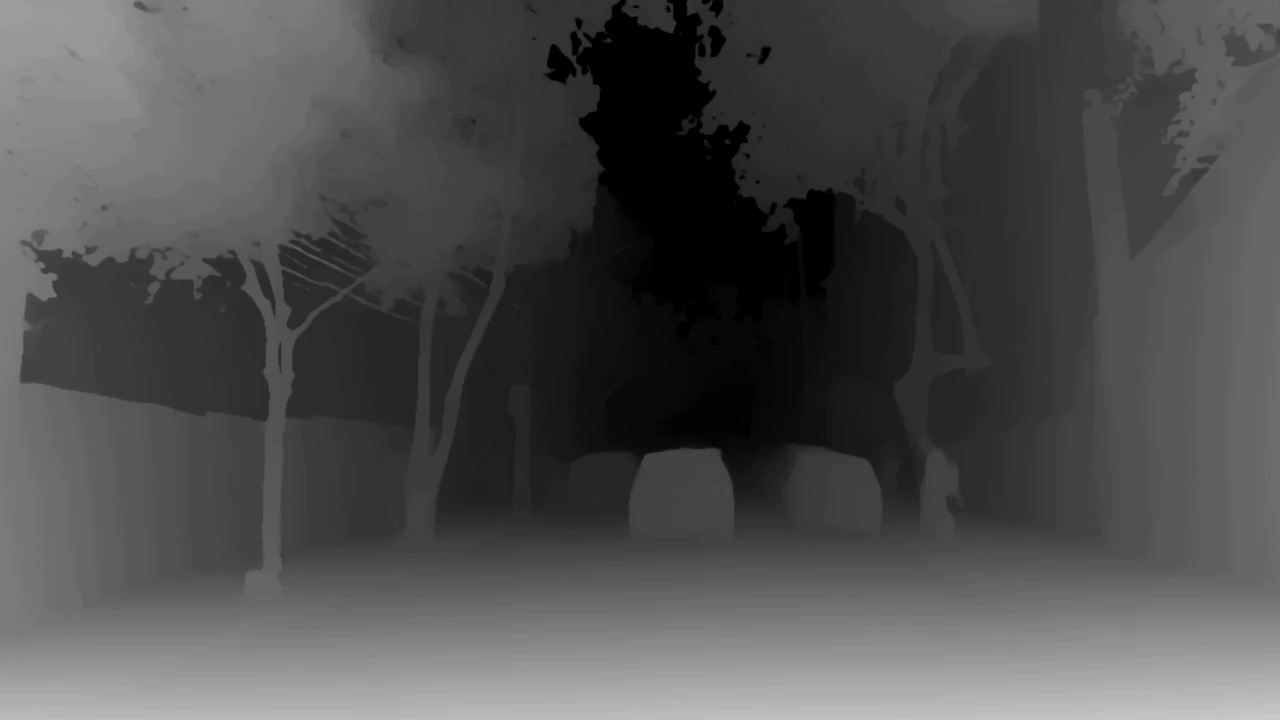
cd cookbooks/cosmos3/generator/transferAs an input sample, the following depth video is attached. The 0th frame of this video is reproduced below.
Here, you can perform from the depth to video generation process for in-car video samples as follows.
torchrun --nproc-per-node=1 \
  -m cosmos_framework.scripts.inference \
  --parallelism-preset=latency \
  -i specs/depth.json \
  -o ./output/ \
  --checkpoint-path Cosmos3-Nano \
  --seed 2026
Execute this command and wait for a while (it takes about 45 minutes on an RTX-PRO6000 environment, as there are 50 steps). The following video will be generated in the output.
The specs/depth.json specified here is reproduced below. The mode specification isvideo2videodepthcontrol_pathSpecifying this option seems to result in behavior similar to the previous `transfer` command.
{
  "name": "transfer_depth",
  "model_mode": "video2video",
  "resolution": "720",
  "aspect_ratio": "16,9",
  "num_frames": 121,
  "fps": 30,
  "shift": 10.0,
  "num_steps": 50,
  "seed": 2026,
  "num_video_frames_per_chunk": 121,
  "num_conditional_frames": 1,
  "num_first_chunk_conditional_frames": 0,
  "share_vision_temporal_positions": true,
  "negative_metadata_mode": "none",
  "negative_prompt_keep_metadata": false,
  "guidance": 3.0,
  "control_guidance": 1.5,
  "negative_prompt_file": "../assets/negative_prompt.json",
  "prompt_path": "../assets/depth/prompt.json",
  "depth": {
    "control_path": "../assets/depth/control_depth.mp4"
  }
}
The transfer feature has existed since previous versions.edge/depth/seg/blur(旧vis)In addition, it appears that it can also be generated from WSM (World Scenario Map format: 3D annotation video), which was also available in older versions for the auto-mode.
Conclusion
This article introduced the video generation function of Cosmos3. For testing in an RTX-PRO6000 environment, the model used was 16B.Cosmos3-NanoHowever, we have confirmed that it is now possible to generate videos with higher accuracy than in previous versions (such as 2.5).
Although not included in this sample, it is also possible to generate audio in addition to video by adding an option.
We also offer a server trial environment service (GPU Advanced Test Drive: GAT) that allows customers to actually try generating Cosmos3.
For example, the higher-end model isCosmos3-SuperIf you'd like to rent a DGX-B200 for a short period to try it out, please feel free Inquiry.
Furthermore, the Nexty Electronics Development Department investigates cutting-edge technological trends and conducts numerous practical tests on PCs, GPU servers, and edge devices such as NVIDIA DRIVE Thor. We also provide Inquiry and technical assistance for AI-related inquiries. Please feel free Inquiry regarding these matters as well.
Links to past GAT-related articles
*NVIDIA Cosmos is a trademark of NVIDIA Corporation